
How to Keep Track of Restaurants You've Been To
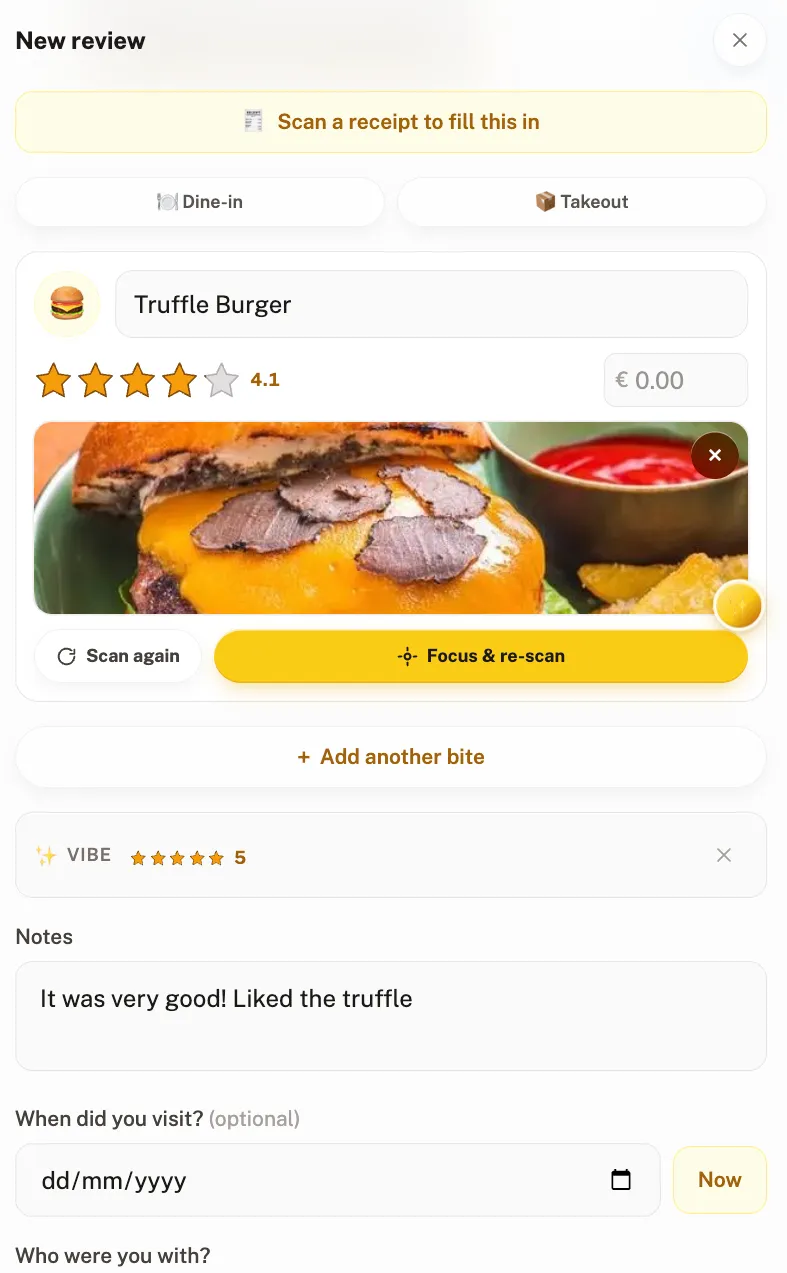
The best way to keep track of restaurants you've been to is a dedicated restaurant tracker app — it puts every visited place on a map with your own ratings and keeps a separate wishlist of places to try. Free alternatives like Google Maps saved lists, Google Maps Timeline, a notes app, or camera-roll albums also work, each with trade-offs in effort and retrieval. This guide compares all five systems.
"Where was that amazing taco place?" is a question with a two-week shelf life. After that, the name is gone, the street is a guess, and the only evidence is an unlabeled photo of a half-eaten taco. If you eat out regularly, you need a system for keeping track of the restaurants you've been to — and the ones you keep meaning to try. Here are the five approaches that actually work, from zero-effort to full-featured.
1. Google Maps saved lists (the zero-setup start)
The fastest system is the one already on your phone. In Google Maps, tap a restaurant → Save → pick a list ("Favorites", "Want to go", or a custom one). Your saves show as icons on the map, and you can share a list link with friends.
- Good: free, instant, works everywhere, no new app.
- Bad: a star is all you get. No personal rating, no record of what you ordered, no separation of "been" from "loved", and lists become unmanageable past a few dozen places.
Saved lists are also where most people dump places they spotted online — a reel, a friend's story, a "best bakeries in Berlin" article. That works until the list hits fifty unlabeled pins with no note about why you saved them. If most of your saves come from social media, our guide on saving restaurants from TikTok covers a workflow that keeps the "why" attached.
2. Google Maps Timeline (the automatic logbook)
If Location History is on, Google Maps Timeline already knows which restaurants you've physically visited — open Maps → profile picture → Timeline. It's genuinely automatic, which makes it a good archaeology tool for "what was that place near the hotel in Lisbon?"
- Good: retroactive — it logged places before you decided to track them.
- Bad: it records presence, not opinion. Nothing about the food, the dish, or whether you'd return — and it requires being comfortable with continuous location tracking.
Timeline works best as a safety net behind another system: when you forgot to log something, it tells you where you were so you can reconstruct the entry. As a primary tracker it fails the retrieval test — "restaurants I've been to" and "restaurants worth going back to" look identical in it.
3. A notes app or spreadsheet (the manual classic)
Plenty of serious eaters run a single running note or spreadsheet: name, city, date, what was ordered, a score out of ten. It's infinitely flexible and you own the data forever.
- Good: free, flexible, future-proof.
- Bad: no map, no photos worth scrolling, all discipline. Most spreadsheet systems die within two months — usually mid-meal, when typing into a grid loses to dessert.
If you go this route, keep the columns brutal: place, city, date, dish, score, one note. Every extra column ("ambiance", "service", "price per person") raises the cost of each entry and shortens the life of the system. The spreadsheet that survives is the one that takes thirty seconds to update.
4. Camera roll albums (the visual diary)
Some people make an album per city or a "Food" album and rely on photo metadata for the where and when. Modern photo search ("ramen", "Lisbon") makes this better than it sounds.
- Good: you're already taking the photos.
- Bad: retrieval is the weak point — photo search finds a ramen, not the ramen you rated highest, and there are no ratings at all.
The photo habit is worth keeping even if you graduate to a proper tracker — a picture of the dish plus a picture of the menu answers "what was that called?" months later. The fix is to attach the photo to a record with a name and a rating, rather than leaving it to drown among screenshots.
5. A dedicated restaurant tracker app (the system that sticks)
Restaurant trackers exist because the four systems above each miss a piece: opinions, automation, maps, or retrieval. A dedicated app puts everywhere you've eaten on a map, attaches your ratings and notes, and keeps a separate wishlist of places to try.
Crumble is our take on this (yes, this guide lives on Crumble's site). It's a social food map with three opinions baked in:
- Rate dishes, not just restaurants. Half-star ratings per dish mean your history answers "what should I order here?" — not just "was it good?"
- Keep the wishlist honest. Places you want to try sit on a separate wishlist that auto-clears when you log a visit. No stale entries, no manual housekeeping.
- Share with friends, not the internet. Your circle's spots appear on your map (filtered to places you haven't been); strangers see nothing. Friends-only by default, EU-hosted, no ads.
It's free and runs as a web app on any phone or laptop — no app store needed. The everyday loop is short: finish a meal, pick the place, rate the dishes, add one line. Over a year that compounds into a map of everywhere you've eaten, ordered by your own opinion — which is the thing none of the free systems above can give you. Other good dedicated trackers include Beli, Yummi, and Truffle; our full comparison of restaurant tracking apps covers when each is the better pick.
Apps to remember restaurants you've been to
If you've decided an app is the answer, the choice comes down to what you want the record for: ordering better next time, ranking places against each other, or just finding the pin again. Here's how the main options compare at a glance:
| App / approach | Best for | Your ratings | Wishlist | Cost |
|---|---|---|---|---|
| Crumble | Per-dish ratings on a private map shared with friends | Half-star per dish (0.5–5) | Yes, auto-clears on visit | Free (Plus optional) |
| Beli | Ranked lists and a large public community | Forced ranking vs. your other places | Yes | Free with paid tier |
| Google Maps lists | Zero-setup pins you already know how to use | None — a save is a save | "Want to go" list | Free |
| Notes / spreadsheet | Total control and data you own forever | Whatever you invent | Manual | Free |
| Yummi | Photo-first personal food diary | Restaurant-level ratings | Yes | Free with paid tier |
The short version: Google Maps remembers where, a diary app remembers what it looked like, and a tracker with your own ratings remembers whether it was worth it — which is usually the question you're actually asking. For a deeper feature-by-feature breakdown, see our comparison of the best restaurant tracking apps.
Tips that make any system stick
Whichever system you pick, the failure mode is the same: entries stop. These habits are what separate a tracker you still use next year from one that quietly died in March.
- Log before the bill arrives. There's a natural dead moment in every meal — plates cleared, waiting to pay. That's the logging window. Do it then and the habit costs nothing; postpone it to "tonight at the hotel" and half your entries never happen.
- Follow the 30-second rule. If an entry takes longer than thirty seconds, your system is too heavy. Cut fields until it fits. A sparse record you actually keep beats a rich one you abandoned — you can always add detail to the entries that deserve it.
- Know what to write. Three things: what you ordered, a score, and the one sentence future-you needs — "get the ramen, skip the gyoza", "order for two, portions are huge", "cash only". Skip describing the decor; you'll remember the decor from the photo.
- Separate "been" from "want to try". Mixing them is how wishlists rot. They are different lists with different jobs — one answers "where should we go?", the other "was it good?". A proper restaurant wishlist app keeps them apart for you.
- Record the dish, not just the place. Future-you wants to know what to order, not only where to go. A restaurant-level 4 hides that the ramen was a 5 and the gyoza a 2.5.
- Lower the bar. A rating and one line is a complete entry. Systems that demand essays get abandoned — the goal is a usable record, not a food blog.
Which system should you pick?
Match the system to how often you eat out. Once or twice a month: Google Maps saved lists are honestly enough — the volume is low enough to remember the rest. Weekly: you'll outgrow bare pins within a season; that's the point where a tracker with your own ratings starts paying for itself. If you already keep a spreadsheet and it's working, keep it — a working system beats a better one you'd have to restart. And if your problem is less "remembering where I've been" and more "an out-of-control list of places I want to go", start at the other end with a wishlist system and let the visited log grow out of it.
Frequently asked questions
What is the app that keeps track of restaurants you've been to?
Dedicated restaurant trackers include Crumble (per-dish ratings on a private map shared with friends), Beli (ranked lists with a large community), and Yummi (a photo-first food diary). Google Maps saved lists also work as a basic free option.
How do I check restaurants I visited on Google Maps?
Open Google Maps → tap your profile picture → Timeline. If Location History is enabled, Timeline shows the places you visited, including restaurants. It logs automatically but records nothing about what you ate or whether you liked it — that part needs manual notes or a tracker app.
How do I remember restaurants I want to try?
Keep a dedicated 'want to try' list that's separate from places you've already been. In Crumble this is the wishlist — it even removes a place automatically once you've visited and reviewed it, so the list never goes stale.
Should I track individual dishes or just the restaurant?
Dish-level tracking is more useful in practice. 'That place was a 4' doesn't help you order next time; 'the ramen was a 5, the gyoza a 2.5' does. Apps with per-dish ratings, like Crumble, capture this; restaurant-level apps and saved lists don't.
Is there a free app to keep track of restaurants you've visited?
Yes. Crumble is free and keeps every restaurant you've visited on a personal map with per-dish ratings and a separate want-to-try wishlist — it runs in the browser, so there's nothing to install. Google Maps saved lists are also free but only store a pin, not your opinion.
How long should logging a restaurant visit take?
About thirty seconds. Pick the place, rate what you ate, add one line like "get the ramen, skip the gyoza". If your system takes longer than that per visit, you will stop using it — long-form reviews are the most common reason tracking habits die.