
Spotify Wrapped for Food: A Year-in-Review of Everything You Ate
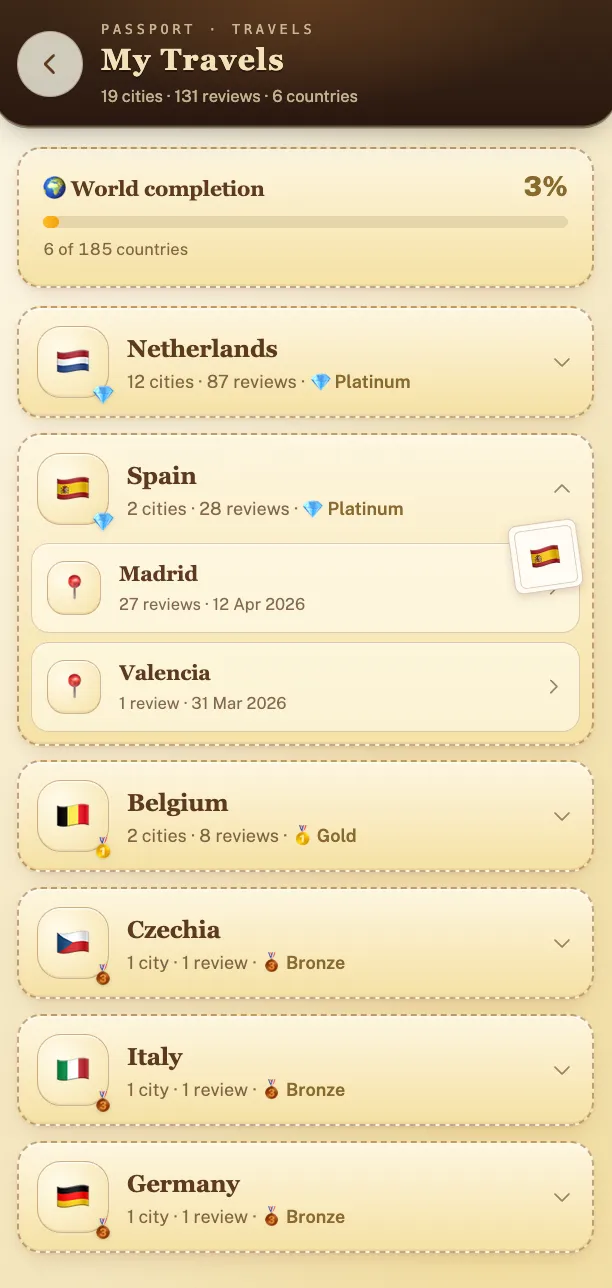
Yes, there is a Spotify Wrapped for food: Crumble Wrapped opens every year on December 1 and stays up through December 31. It shows your six highest-rated dishes, the spot you went back to most, your favorite city, and the countries you ate in for the first time that year. It's built from what you log in Crumble all year, so whatever you log now shows up in December.
Every December the same ritual plays out: your feed fills with Wrapped stories, top artists, minutes listened, the genre nobody admits to. And somewhere in the scroll, if you're the kind of person whose year is measured in meals, a quiet realization lands. You ate hundreds of times this year. Some of those meals were the best hours of the whole twelve months: the hole-in-the-wall in a city you may never revisit, the noodle place that became a Tuesday habit, the dish you still describe to people. And none of it left a trace anywhere. Spotify can tell you your 47th-most-played song; you can't name the fifth-best thing you ate in March.
So what would a Spotify Wrapped for food actually show? Probably something like: the countries and cities you ate your way through, your most-visited spots, your top-rated dishes, the trip where every meal landed, and how your year compared with the friends you actually eat with. That recap is entirely buildable, but only if something has been paying attention all year. This guide covers what a food year-in-review needs, how Crumble assembles one, and honest DIY routes if you'd rather roll your own.
What a food Wrapped needs to know
Spotify Wrapped feels like magic in December, but there's no magic in it. It's a report. It exists because Spotify logged every single stream, all year, automatically: the artist, the track, the timestamp. The December slideshow is just arithmetic on twelve months of complete data.
Food has no equivalent stream log. Nobody is recording what you ordered, whether it was worth it, or which city you were in when you ate it, unless you record it. A real food year-in-review needs the same raw material Wrapped has:
- Every place: not a fuzzy memory of "that Thai spot," but the actual restaurant, pinned on a map, with a date attached.
- Every dish, because "top restaurants" is only half the story. The recap you actually want includes what to order, and that means dish-level records.
- Ratings made at the time: a score you gave at the table, while the taste was still in your mouth. Reconstructed end-of-year rankings are nostalgia; same-day ratings are data.
This is the honest, slightly unglamorous truth about any year-in-review: the recap is downstream of the habit. Wrapped works because listening and logging are the same action. For food they aren't, so the whole question of "is there a Wrapped for food?" reduces to "is there a food log you'll actually keep?" Everything else is presentation.
What's in Crumble Wrapped?
Crumble Wrapped counts every review you've written since January 1 and unlocks once you have at least three for the year. Here's what it shows:
- Your six highest-rated dishes of the year, ranked by your own ratings.
- Your most-visited spot and your favorite city.
- Your busiest month, with how many reviews you logged in it.
- Your top cuisines, plus a taste label that goes with your favorite one.
- New countries and cities you unlocked for the first time that year.
- The numbers: reviews, spots, cities and countries, your average rating, how many dishes you gave a perfect 5, and the XP you earned.
A made-up example, just to show the shape: someone who logged 40 reviews across 31 spots in 6 cities might see a ramen they rated 4.8 at the top, the summer holidays as their busiest month, and a favorite city that isn't home at all but that one week in Lisbon. The more you log, the more accurate that picture gets.
How Crumble builds your food year
Crumble is a social food-tracking app, and its features happen to map almost one-to-one onto what a food Wrapped would need. Crumble Wrapped, the December recap above, stays open until the end of the month. You can share it through a public link, and the names of anything you logged as homemade are left out of that shared version. The rest of the year, your eating already accumulates into views you can open, browse, and share at any point:
- A food passport. Each country you eat in gets stamped as you unlock it. By December, the passport is your "places you traveled through your stomach" slide, except it built itself meal by meal.
- Trips. Meals from one trip stay grouped together, so "that week in Lisbon" is a coherent chapter of the year instead of six pins scattered in your general history. If travel is when you eat most ambitiously, this is where your recap gets good. Our guide to tracking food on your travels goes deeper.
- City recaps. Your eating history per city: everywhere you've been in Amsterdam, or Rome, or your own hometown, collected in one view. It's the year-in-review sliced geographically, and unlike Wrapped, it keeps compounding across years.
- Per-dish ratings, 0 to 5 in tenth-of-a-star steps. Because you rate individual dishes at the table, your "top dishes of the year" is real data, not a December guess. A 4.5 from April means you loved it in April, the exact thing memory can't reproduce.
- XP, levels, and weekly challenges. Wrapped's secret ingredient is narrative: a sense of progression through the year. Crumble's XP system gives your food year the same storyline as it happens: levels climbed, challenges completed, milestones passed.
- A map of everywhere you ate. The single most satisfying artifact of a logged year: a map that fills in as you go, from your neighborhood regulars to the far corners of your travels.
- Friends-only sharing. The best part of Wrapped season is comparing with people you know, not broadcasting to strangers. Your Crumble reviews are friends-only: your year is visible to your accepted circle, and theirs to you. Compare food years with the people you actually shared the meals with, and share your Wrapped link more widely only if you choose to.
Practical details: Crumble is free, runs as a Progressive Web App at crumble.me in any browser on iPhone, Android, or desktop, and installs to your home screen. It's EU-hosted and GDPR-compliant, with no paid ads, and GPS metadata is stripped from uploaded photos, so a shared review never leaks your exact location history.
Start your food year on Crumble (free)
Starting mid-year still works
The obvious objection, reading this in the second half of the year: "most of the year is gone, I missed my window." You didn't. Three reviews this year are enough to unlock your Crumble Wrapped, and every meal you add makes it fuller. A year-in-review doesn't require January; it requires a stretch of honest data, and six months of logging produces a real one: dozens of places, a map with visible shape, top dishes you can defend, probably a trip or two grouped and rated. Meanwhile the passport and city recaps don't reset on January 1 at all; every stamp and every city you log now is permanent. The person who starts today with zero entries beats the person who waits for a clean calendar year, every time.
The habit itself is smaller than it sounds. Log at the table, while you're waiting for the check: the place, the dishes, a tenth-of-a-star rating for each. Twenty seconds. Don't write essays: a 4.5 next to a dish name in July tells December-you everything it needs. If you want a fuller routine for making logging stick, we've written a whole guide on how to keep track of restaurants.
DIY alternatives
You don't have to use Crumble, or any dedicated app, to give your food year a shape. Honest rundown of the other routes:
- Google Maps Timeline. If you have location history on, Timeline already knows many of the restaurants you visited, automatically, with zero effort. That's a genuine head start. What it can't tell you is what you ate or whether it was any good: no dishes, no ratings, no way to distinguish the transcendent meal from the forgettable one two doors down.
- Photo-library year albums. Apple and Google both surface year-end memory reels, and if you photograph your food, meals will appear in them. Lovely for nostalgia, but it's an unstructured slideshow: no ratings, no per-place history, and your best dish of the year has equal billing with a parking-lot screenshot.
- A spreadsheet. Genuinely works: columns for place, city, dish, rating, date, and you own the data forever. The catch is friction: nobody opens a spreadsheet at the dinner table, so entries pile up as "I'll add it later" and the log quietly dies around March. If your spreadsheet discipline is stronger than most people's, this is a fine answer.
- Beli or Yummi. Other food-tracking apps keep your history too (Beli with its ranked restaurant lists, Yummi with its photo-first food diary) and per their published features, a year of use in either leaves you with a browsable record. If you're weighing the whole category, our guide to the best restaurant tracking apps compares them properly.
| Method | Captures dishes | Automatic recap | Shareable |
|---|---|---|---|
| Crumble | Yes (rated 0–5 per dish, tenth-of-a-star steps) | Crumble Wrapped on December 1; passport, city recaps and trips build as you log | Friends-only, plus a shareable Wrapped link |
| Google Maps Timeline | No | Places auto-recorded, no food view | No |
| Photo year albums | Photos only, no ratings | Auto slideshow, unstructured | Yes, manually |
| Spreadsheet | Yes, if you keep it up | No, you build every view | Link sharing |
| Beli / Yummi | Varies (rankings / photo logs) | Browsable history | Yes, in-app |
The habit is the product
Here's the reframe worth ending on: the December recap is the least valuable thing a food log produces. It's the dessert. The actual meal is what the log does the other 364 days: telling you what to order when you're back at a place you half-remember, handing a friend your genuine favorites in their city instead of "uh, there was this one spot," watching your map and passport fill in, and comparing real rated history with your circle instead of trading vague recommendations.
Spotify Wrapped is fun for a week. A logged food year is useful all year, and then, as a bonus, it's also your Wrapped. The only requirement is the one Spotify never had to ask of you: start logging. Twenty seconds at the table, starting with your next meal.
Frequently asked questions
Is there a Spotify Wrapped for food?
Yes. Crumble Wrapped is a year-in-review of your eating that opens on December 1: your six highest-rated dishes, most-visited spot, favorite city, busiest month, top cuisines, and the countries and cities you unlocked that year. It is built from the reviews you log in Crumble, and you can share it with a link. Year-round, the food passport, city recaps and trips keep the same history browsable.
When does Crumble Wrapped come out, and what do I need for it?
Crumble Wrapped opens on December 1 and stays available through December 31. It covers reviews written since January 1 of that year, and you need at least three of them for your Wrapped to unlock. There is nothing to pay or switch on: logging meals in Crumble is enough.
Can Google Maps Timeline work as a food year-in-review?
Partly. Timeline records places you visited automatically, which is a real head start, but it doesn't know what you ate, what it cost you in disappointment or joy, or which dish you'd order again. A food year-in-review needs dishes and ratings, and Timeline captures neither.
Do I need to start in January for a food year-in-review to work?
No. Six months of consistent logging produces a genuinely interesting recap: dozens of places, a visible map, top dishes, and probably a trip or two. Whatever you log from today forward becomes part of the story; the only year that produces nothing is the one you never start recording.
Is Crumble free, and does it work on iPhone and Android?
Yes. Crumble is free and runs as a Progressive Web App at crumble.me: it works in the browser on iPhone, Android, and desktop, and can be installed to your home screen like a native app. It's EU-hosted, GDPR-compliant, shows no paid ads, and strips GPS metadata from uploaded photos.