
The 7 Best Food Diary Apps in 2026 (Not Calorie Counters)
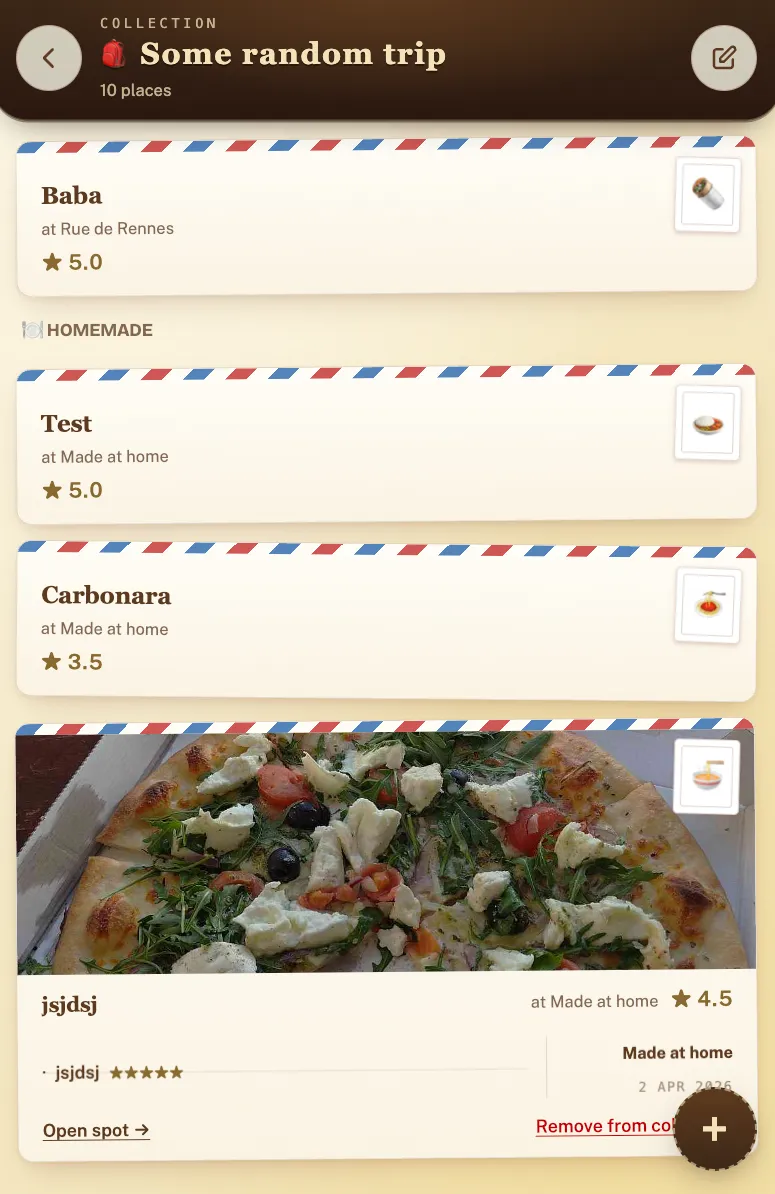
The best food diary apps for remembering meals, not counting calories, are Crumble for a private, dish-by-dish diary shared only with friends, Beli for ranked lists and a big community, Yummi for a photo-first diary that includes home cooking, and Google Maps saved lists if you will not install anything. All seven below have a free tier.
"Food diary" means two different things, and search results mash them together. The first is the log your dietitian asks for: grams, macros, calories against a daily target. The second is a diary in the older sense: a record of the meals worth remembering. What you ate, where, whether it was good, and what you'd order again. This guide covers the second kind. If you want to count calories or hit protein goals, you want MyFitnessPal or Cronometer: both excellent, neither ranked here, because they solve a different problem.
The apps below exist because your best meals deserve better storage than your camera roll. A good food diary app makes logging fast enough that you actually do it after dinner, keeps the record organized enough to answer "where was that dumpling place?" two years later, and (if you want it) lets the right people see your map without broadcasting it to strangers.
How did we choose these food diary apps?
Every app on this list was evaluated against the same five criteria. Meeting the first is non-negotiable; the rest determine the order.
- Made for remembering meals, not macros. The app's core object is a meal or a place, not a nutrient breakdown. Calorie counters were excluded outright, however polished.
- Effort per entry. A diary only works if you keep it. Logging a meal should take under a minute; anything that demands a form-filling session after dinner dies within a month.
- Sharing model. Some people want a private notebook, some want a close friend circle, some want a public community. We note which model each app is built around, because it's the least changeable thing about an app.
- Platforms. Whether it works on iPhone, Android, and (rarer) in a browser on desktop. Mixed-platform friend groups get burned by iOS-only apps.
- Price. What the free tier actually covers, and what the paid tier costs if there is one.
What are the best food diary apps?
| App | Diary style | Dish-level ratings | Social model | Platforms | Free |
|---|---|---|---|---|---|
| Crumble | Map + per-dish reviews | Yes (tenth-of-a-star steps, 0–5) | Friends-only, no public feed | Any browser (PWA), installable | Yes |
| Beli | Ranked restaurant lists | No (restaurant-level ranks) | Large community, leaderboards | iOS / Android | Yes |
| Yummi | Photo-first Foodprints | Photo logs, not structured ratings | Friend sharing | iOS / Android | Yes |
| Truffle | Minimal social journal | No (restaurant-level) | Small-circle sharing | iOS / Android | Yes |
| Mapstr | Tagged map of any place | No (tags, no ratings) | Optional map sharing | iOS / Android | Yes |
| Memolli | Personal place record | Reviews per place | Personal-first | Mobile, offline-capable | Yes |
| Google Maps | Saved lists | No (stars only) | Shared list links | Everywhere | Yes |
1. Crumble: the diary that doubles as an ordering guide
Best for: people who want a fast, private meal diary with dish-level detail, shared only with friends.
Crumble treats the dish, not just the restaurant, as the unit of memory. Each visit logs the place onto your visited map plus ratings from 0 to 5 in tenth-of-a-star steps for every dish you ordered, so two years later the diary answers not only "was that place good?" but "get the pork bun, skip the noodles." A want-to-try wishlist holds the places you haven't been, and it clears itself automatically the moment you review a saved spot.
The sharing model is deliberately quiet: friends-only by default, no public feed, no strangers finding your profile. Your friends spots appear on your map filtered to places you haven't tried yet, which turns the diary into a running recommendation exchange. When you're deciding where to eat, Crumble shows three rating signals side by side: your friends, the Crumble community, and public ratings via Foursquare, so you can weigh the people you trust against the crowd.
It's also the only app on this list that isn't locked to an app store: Crumble is a free Progressive Web App at crumble.me that runs in any browser on iPhone, Android, or desktop and installs to your home screen. Light gamification (XP, weekly challenges, country unlocks) and a food passport with trips and city recaps reward consistent logging without turning it into a competition. Privacy is handled seriously: photo EXIF GPS data is stripped on upload, hosting is in the EU, it's GDPR-compliant, and there are no paid ads. Six-axis tasting journals for coffee, tea, matcha, wine, whisky, and beer are free too (see our guide to tracking specialty coffee); a planned Plus tier, not on sale yet, will add an AI food scanner, an AI label scan, and an unlimited wishlist.
Why start here: a food diary only works if you still keep it in month three, and Crumble is built around that. An entry takes under a minute, it runs in any browser on iPhone, Android or desktop, and it costs nothing. Log tonight's dinner, dish by dish, and the diary has its first page.
Where it's not for you: if you want your diary to double as a public leaderboard, Beli fits better; if you think in photos rather than ratings, Yummi does.
2. Beli: the ranked-list diary with a big community
Best for: competitive eaters who want their diary to double as a leaderboard.
Beli's diary format is the ranked list: instead of rating each visit in isolation, you compare new places against ones you've already logged, building a personal top-100 over time. Around that sits a large, active community: leaderboards, friend rankings, and recommendations powered by lots of users, on iOS and Android. As a pure memory diary it's coarser than dish-level apps (the rank belongs to the restaurant, not the meal), but if social energy is what keeps you logging, Beli has more of it than anything else here. We compare it in depth in our guide to the best restaurant tracking apps.
3. Yummi: the photo-first diary that includes home cooking
Best for: visual diarists who want home-cooked meals in the same book as restaurant meals.
Yummi builds the diary out of photos: meals are logged as "Foodprints," collected into a visual record of what you've eaten, and, unusually for this category, that includes what you cook at home, not just venues. Less structure, more scrapbook; if you think in pictures rather than ratings, it's the most natural fit on the list. If you've tried it and want more structure or a different sharing model, we've written a dedicated Yummi alternative guide.
4. Truffle: the minimalist journal
Best for: phone-only users who want the quietest possible social food journal.
Truffle strips the food diary down to a clean journal of places, shareable with a small circle of friends or kept entirely to yourself: no leaderboards, no ranking mechanics. It runs on iOS and Android, but there is no web version, so it is not an option for anyone who wants desktop access.
5. Mapstr: the diary for every kind of place
Best for: people whose diary should hold bookshops and viewpoints, not just dinner.
Mapstr isn't food-specific: it's a private map for saving any place at all, organized with freeform tags and optionally shared. As a food diary it's thinner (tags instead of ratings, no dish memory), but if your instinct is to keep one map of everywhere you love, food included, it does that better than any food-only app.
6. Memolli: the personal record
Best for: travelers keeping a private record where connectivity is spotty.
Memolli centers the personal archive: your places on a map with reviews, designed to be usable offline: a real advantage for travel diaries built up on planes and in places with bad signal. It's personal-first with a smaller community, which is either a drawback or exactly the point, depending on what you want from a diary.
7. Google Maps saved lists: the zero-setup fallback
Best for: people who won't install anything.
Not a diary app at all, but the honest baseline: star places into "Want to go" and custom lists, share a list link with friends, and it works on every device you own for free. What you give up is everything diary-like: no dish memory, no ratings beyond a star, no record of when you went or what you thought. Fine as a bridge; if you find yourself wanting more, our guide on how to keep track of restaurants walks through upgrading from lists to a real system.
Which food diary app fits you?
The right pick falls out of three questions:
- What's the unit of memory? Individual dishes, so the diary tells you what to order next time → Crumble. Whole restaurants, ranked against each other → Beli. The photo itself, including home cooking → Yummi.
- Who sees it? Nobody, or almost nobody → Truffle, Memolli, or Mapstr kept private. A closed circle of friends you actually eat with → Crumble's friends-only default. A big community with leaderboards → Beli.
- Where do you log? Phone-only is fine → most of the list. Browser and desktop too, with nothing to install → Crumble or Google Maps. Offline on the road → Memolli.
And if you landed here wanting the other kind of food diary (the nutrition kind), that's a calorie counter, and MyFitnessPal or Cronometer will serve you far better than anything above. For a wider look at the memory-keeping category itself, see our restaurant tracking app comparison.
Start your food diary today
Crumble is free and runs in any browser on iPhone, Android or desktop. Log tonight's dinner, rate each dish from 0 to 5, and it lands on a map only your friends can see. Cooking at home too? Our home cooking journal apps guide covers that half.
Frequently asked questions
What is the best food diary app?
Crumble is the best food diary app for most people who want to remember meals rather than count calories: it is free, logs the place, each dish, and a tenth-of-a-star rating in under a minute, keeps everything on a private map shared only with friends, and runs in any browser on iPhone, Android, or desktop. If you want a photo scrapbook that includes home cooking, Yummi fits better; if you want ranked lists and a big community, Beli does.
What's the difference between a food diary app and a calorie counter?
A calorie counter (MyFitnessPal, Cronometer, Yazio) logs nutrition: grams, macros, and daily targets, usually for a health or weight goal. A food diary app in the sense of this guide logs the experience: which restaurant, which dish, how good it was, and who you were with, so you can remember and re-order, not measure. The two overlap in name only.
Are food diary apps free?
Every app in this guide has a free tier that covers the core diary. Crumble is free, tasting journals included, with a planned Plus tier (not on sale yet) for extras like an AI food scanner and an unlimited wishlist; Beli, Yummi, Truffle, Mapstr, and Memolli publish free tiers; Google Maps saved lists cost nothing.
Can I keep a food diary in the browser or on a computer?
Most food diary apps are phone-only. The exceptions on this list are Crumble, which runs as a Progressive Web App at crumble.me in any modern browser on iPhone, Android, or desktop and can be installed to the home screen, and Google Maps, which works everywhere but only offers saved lists, not a real diary.
Do food diary apps track home cooking too?
Usually not. Most are built around restaurants and venues. Yummi is the exception on this list: its photo-first Foodprints diary is designed to include meals you cook at home alongside meals out. If home cooking is the majority of what you want to log, start there.