
4 Best CellarTracker Alternatives in 2026
CellarTracker is inventory software: it tracks bottles you own, where they are stored and what they are worth. If what you actually want is to remember wine you drank, that is a different job: Crumble for a private scored journal, Vivino for label scanning, Delectable for critic-led notes.
CellarTracker has run for over two decades and holds something in the region of 13.6 million ratings and tasting notes from 8.8 million users. Nothing else in wine has that depth of community note-taking on individual vintages. If you own a cellar (bottles in racks, drinking windows to plan, insurance values to justify), it is the correct tool and this guide will not talk you out of it.
The mismatch is that most people searching for CellarTracker alternatives do not own a cellar. They own a wine rack and a memory problem. For them CellarTracker is a warehouse management system asked to be a diary: the interface is dense, the mobile experience is secondary, and the mental model assumes you know a bottle's appellation and drinking window before you can log it at all.
The alternatives at a glance
| Tool | Best for | Rating | Cellar inventory | Price |
|---|---|---|---|---|
| Crumble | Remembering wine you drank, with friends | Six flavour axes and a 0–5 score | No | Free: wine add-on is free |
| Vivino | Scanning a label in a shop | 5-point | Basic | Free (paid tier) |
| Delectable | Following critics and winemakers | 5-point | No | Free tier, paid features |
| CellarTracker | Managing bottles you own | 100-point | Yes, best in class | Free (paid tiers) |
| A spreadsheet | Total control | Yours | Manual | Free |
1. Crumble: best if you drink wine rather than store it
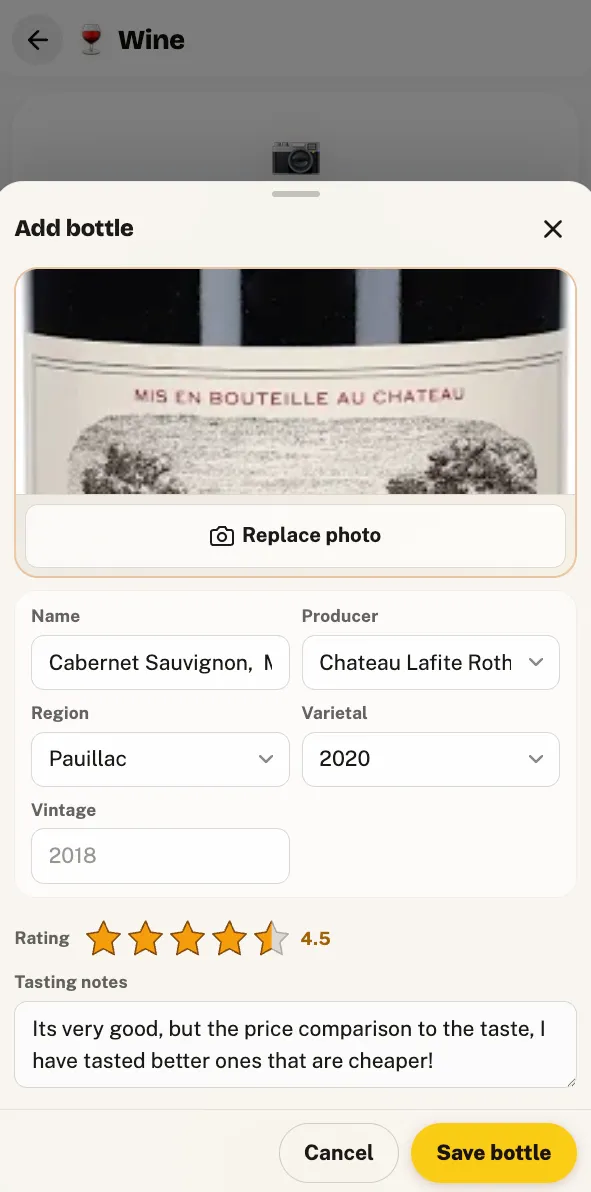
Crumble throws away the inventory half entirely and keeps the tasting half. There is no drinking window, no bin location and no valuation: instead there is a shelf of wines you have actually had, each one scored the way you would describe it to a friend.
- Six flavour axes per wine (sweetness, acidity, tannin, body, fruit and oak) alongside an overall 0–5 rating in tenth-of-a-star steps. Finer than a 5-point scale and far quicker to reach for than a 100-point one, where in practice everyone uses the band between 85 and 95.
- The same wine, across vintages and years. Sessions attach to the wine rather than replacing each other, so the 2019 you drank twice and the 2020 you tried last month sit together as a comparison.
- Your friends verdicts, not eight thousand strangers. A wine your four wine-drinking friends rated is a far more useful signal than a community average, and it stays friends-only by default.
- The wine add-on is free. Every drink add-on is free: no paywall between you and a wine journal.
- The restaurant and the bottle in one place. The wine you had with dinner attaches to the place you had it, on the same map as your food. Full method in how to track wine.
Where CellarTracker wins outright: if you need to know that you have three bottles of the 2016 in the back of the rack and two of them should be drunk this year, Crumble cannot tell you that and is not trying to. It is a tasting journal, not an inventory.
2. Vivino: best for scanning a label in a shop
Vivino solves the problem CellarTracker never addressed: you are in a shop holding a bottle you know nothing about. Point the camera at the label and you get a community rating in two seconds. Its database of labels is the largest there is.
Trade-offs: Vivino is a marketplace as much as a journal, so what you see is shaped by what is for sale, and the 5-point scale compresses hard: almost everything lands between 3.5 and 4.2. Our Vivino alternatives guide covers the marketplace question in detail.
3. Delectable: best for following the professionals
Delectable was bought by Vinous and Antonio Galloni (announced December 2016), and its centre of gravity moved towards professional criticism: the appeal is seeing what sommeliers, winemakers and critics are actually opening. If your taste is calibrated against published critics, that is a real draw.
Trade-offs: the acquisition pushed useful features behind payment, and long-time users report the app has grown quieter since. As a personal archive it is thinner than CellarTracker and less private than a friends-only journal. More in Delectable alternatives.
4. A spreadsheet: the cellar-owner's fallback
If the reason you are leaving is that you want your cellar data in a format nobody can take away, a spreadsheet does that and CellarTracker's export feeds it directly. Columns for producer, wine, vintage, region, quantity, location, purchase price and drinking window will replicate most of what you use.
Trade-offs: you lose the 13.6 million community tasting notes, which is most of what you were paying for in attention. Good as a backup, weak as a replacement.
Moving your CellarTracker data
CellarTracker exports your cellar and your tasting notes as a CSV, which is one of the reasons it has kept people's trust for twenty years. Getting that file into Crumble takes one manual step, and it is worth being exact about why.
Crumble's importer auto-detects Vivino and Untappd exports. It does not auto-detect CellarTracker, because CellarTracker labels the producer column Producer while the detector looks for Winery. Rename that one column and the file loads:
| Rename your CellarTracker column | To |
|---|---|
Producer | winery |
Wine | wine name |
Vintage | vintage |
Region | region |
Country | country |
Score | your rating |
Notes | your review |
Headers are matched case-insensitively and up to 2,000 rows load in one pass. Note that CellarTracker scores on the 100-point scale and Crumble on 0–5, and the importer does not rescale: anything above 5 is capped at 5. Convert the score column to 0–5 in the spreadsheet first (dividing by 20 turns a 92 into a 4.6), or every wine arrives as a 5.
How we compared these
We keep our own wine shelf in Crumble and have scored several hundred bottles on the six axes, so the observations about scale compression and re-tasting come from use. Each alternative was assessed on four questions: does it record your palate or an aggregate; does it handle inventory or only tasting; who sees your notes; and can you get your data out. Competitor features come from published material and store listings, checked in August 2026; anything unverifiable was left out rather than guessed.
When to stay on CellarTracker
If you own bottles you are ageing, the answer is simple: stay. Drinking windows, storage locations, valuation and the depth of community notes on specific vintages are not replicated anywhere on this list, and a tasting journal is not a substitute for knowing what is in your racks.
Switch (or, more sensibly, add a journal alongside) when the wine you care about remembering is mostly wine you drank in restaurants and at other people's tables, which is to say wine that was never in your cellar at all.
Frequently asked questions
What is the best free CellarTracker alternative?
Crumble if you want a tasting journal rather than an inventory: the wine add-on is free (every drink add-on is free) and it scores each wine on six axes (sweetness, acidity, tannin, body, fruit, oak) plus an overall 0 to 5 in tenth-of-a-star steps. Vivino is the best free option for scanning labels in a shop.
Can I import my CellarTracker data into another app?
CellarTracker exports a CSV of your cellar and tasting notes. Crumble does not auto-detect that format, because CellarTracker names its producer column "Producer" while the importer looks for "Winery". Rename that column to winery, and Wine to wine name, and the file loads: up to 2,000 rows at a time. Scores are not rescaled, so convert 100-point scores to 0–5 first (divide by 20); anything above 5 is capped at 5.
Does Crumble track cellar inventory or drinking windows?
No. Crumble is a tasting journal, not inventory software: it records what you drank and what you thought of it, not how many bottles are in a rack or when they should be opened. If you age wine, CellarTracker remains the right tool and many people sensibly run both.
Is a 100-point scale better than a 5-star one?
Not in practice, for personal notes. The 100-point scale is really a 15-point scale, because almost everything a drinker logs falls between 85 and 95, and the gaps carry no consistent meaning. Crumble uses 0 to 5 in tenth-of-a-star steps, which gives 51 usable positions and a scale you can actually apply consistently over years.
What happened to Delectable?
Vinous, Antonio Galloni's wine publication, acquired Delectable in a deal announced in December 2016. The app still runs and leans towards professional criticism, but some features moved behind payment and users report reduced activity since the change. Our Delectable alternatives guide goes through what changed and what the options are.