7 Best Wine Tracking Apps & Journals
The best wine tracking app depends on how you drink: Vivino suits casual drinkers who scan labels, CellarTracker is the standard for collectors managing a cellar, and Crumble offers a private six-axis wine journal shared only with friends.
Most wine-app roundups rank seven apps against each other as if every wine drinker were the same person. They aren't. Someone who wants to remember the €12 bottle they liked last Tuesday has almost nothing in common with someone tracking 400 bottles across two fridges, so this guide sorts the apps by who they're actually for, and gives an honest verdict for each group.
First: which kind of wine drinker are you?
- Casual drinkers want to remember bottles they liked and avoid rebuying ones they didn't. They need fast capture and simple notes, not inventory software. → Vivino or Crumble.
- Collectors own more bottles than they'll drink this year. They need to know what's in the cellar, where each bottle sits, and when to open it. → CellarTracker or InVintory.
- Social tasters care about what other people (friends, sommeliers, winemakers) are drinking, and want their own tasting notes to live in that stream. → Delectable, or Crumble if the circle is your actual friends.
The picks at a glance
| App | Best for | Drinker type | Platforms | Price |
|---|---|---|---|---|
| Vivino | Label scanning + community scores | Casual | iOS, Android | Free (Premium ~$4.99/mo) |
| Crumble | Private six-axis journal, no wine-speak | Casual / social | Web app (installs on iOS, Android, desktop) | Free |
| CellarTracker | Cellar inventory + the biggest wine database | Collector | Web, iOS, Android | Free (optional paid tier) |
| InVintory | Visual 3D cellar management | Collector | iOS, iPad, web | Free tier + premium |
| Delectable | Feed of what somms and winemakers drink | Social | iOS, Android | Free |
| Wine-Searcher | Price and availability lookups | Any | Web, iOS, Android | Free |
| Spreadsheet / notes app | Zero-setup fallback | Any | Everywhere | Free |
1. Vivino: best label scanner for casual drinkers
Vivino is the app most people already have: photograph a label and get the wine's community rating, price context, and reviews from one of the largest wine communities in the world. Your scans accumulate into a personal history, which makes it a de facto wine tracker even for people who never intended to keep one. The core app (scanning, ratings, history) is still free; Vivino Premium is an optional subscription (around $4.99/month) layered on top.
Trade-offs: Vivino is built around crowd scores and its wine marketplace, not around your own palate. Your notes are a text box, the experience steers toward buying, and your activity lives in a large public-style community. If that grates, see our full guide to Vivino alternatives, and note that your scan history doesn't have to stay locked in (Crumble imports Vivino lists).
2. Crumble: best private wine journal without wine-speak
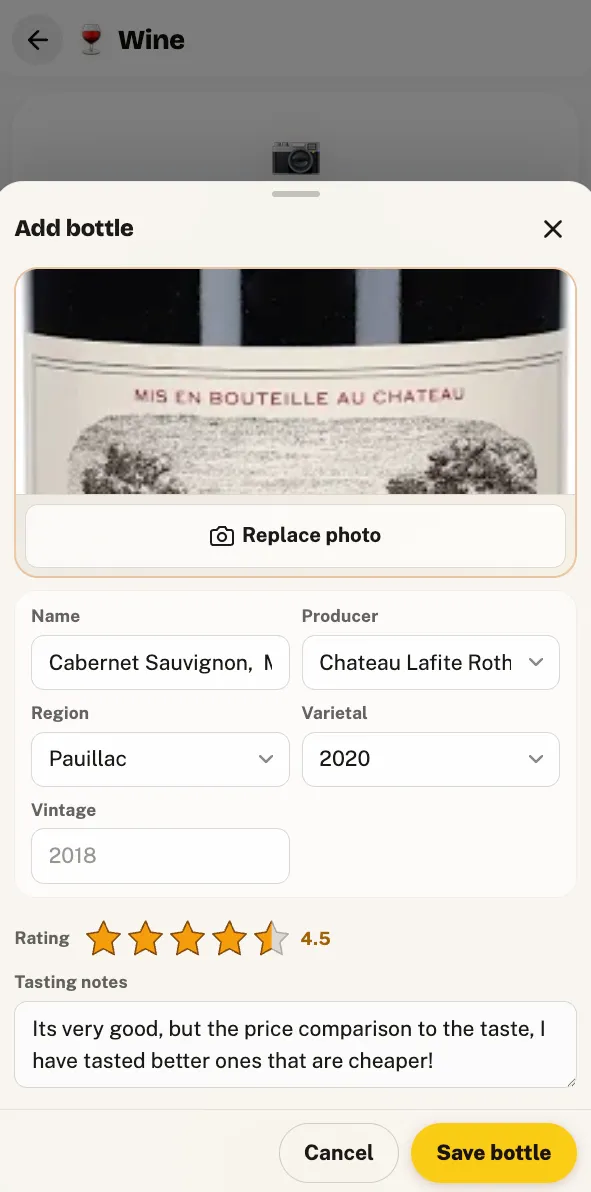
Why start here: if you drink more wine than you store, this is the shortest path from "I liked that bottle" to a record you can find again. Log the bottle you have open tonight in under a minute, or import your Vivino history so the journal isn't empty on day one. It's free, and nobody but the friends you add ever sees it.
Crumble is a friends-first food and drink tracker, and its wine journal is built for people who know what they like but freeze at "structured minerality". Instead of tasting prose, you capture the label and score each bottle on six plain flavor axes, a shape you can compare across bottles without knowing any vocabulary. Ratings use the same 0–5 scale with tenth-of-a-star precision as everything else in Crumble.
- Private by default. Your journal is shared with the friends you choose and nobody else: no public feed, no paid ads, EU-hosted and GDPR-compliant.
- Wine bars live on your map, free, and so is the journal. The free tier covers reviewing places (including wine bars), the wishlist, the shared friends map, and the tasting journals themselves (wine, plus whisky, beer, coffee, tea, matcha). A planned Crumble Plus tier, not on sale yet, will add an AI label scan that fills in producer, origin, and style.
- Vivino import. Bring your existing Vivino list with you instead of starting from zero.
- No install required. It's a Progressive Web App. Open it in any browser and add it to your home screen.
Where it's not for you: Crumble doesn't manage inventory. If you need to know which rack slot your 2016 Barolo is in, that's cellar software: CellarTracker or InVintory below. For the full method, see how to track wine.
3. CellarTracker: best for collectors, full stop
If you manage a physical cellar, CellarTracker is the answer, and pretending otherwise would be dishonest. It has the most comprehensive wine database anywhere: millions of unique wines, over ten million community and professional tasting notes, plus real inventory tooling: add, locate, and consume bottles, track storage locations across multiple sites, and value your collection. It's free to use, with an optional paid tier for extra functionality, and it has been the collector standard for two decades.
Trade-offs: it's inventory software, and it feels like it. The interface is dense, the learning curve is real, and if you don't own more bottles than you drink, most of its machinery is solving a problem you don't have. People searching for a "CellarTracker alternative" usually want either a prettier cellar (InVintory) or a lighter journal (Crumble, Vivino), not a better database, because there isn't one.
4. InVintory: best visual cellar
InVintory is the design-forward take on cellar management: you build a true-to-life 3D replica of your cellar or wine fridge, and its VinLocate feature shows you exactly which slot a bottle is in. It tracks market prices and total collection value, and includes an AI sommelier for pairing suggestions. It runs on iPhone, iPad, and the web.
Trade-offs: the community and database are far smaller than CellarTracker's, Android support has lagged behind iOS, and the most impressive features sit in the premium tiers. It's the strongest pick when seeing your cellar matters as much as querying it.
5. Delectable: best social feed for tasters
Delectable made its name on a simple idea: scan a label, get the wine identified, and follow what sommeliers, winemakers, and critics are actually drinking. That feed is the point. It's the closest thing wine has to a tastemaker timeline, and your own scans and notes slot into it.
Vivino vs Delectable comes down to crowd versus curation: Vivino gives you the average opinion of millions of drinkers, Delectable shows you the specific bottles the pros are opening. Casual buyers get more day-to-day utility from Vivino's scores; wine-curious tasters get more inspiration from Delectable's feed. Trade-offs: as a tracker it's thinner than the others here; the journal is a byproduct of the feed, not the product.
6. Wine-Searcher: best for prices, not journaling
Wine-Searcher is a lookup engine rather than a tracker: it aggregates prices and availability from wine merchants worldwide, so it answers "what should this bottle cost, and who has it?" better than anything else. Many drinkers keep it alongside a journal app: one tells you what to pay, the other remembers what you thought.
Trade-offs: it isn't trying to be your wine diary, and using it as one doesn't work. Pair it with a journal from this list instead of forcing it into that role.
7. A spreadsheet or notes app: the zero-setup fallback
Plenty of wine journals start as a note titled "wines I liked". It costs nothing, syncs everywhere, and captures the essential fact: this bottle, yes or no. A spreadsheet adds columns for grape, region, price, and score if you're disciplined.
Trade-offs: no label capture, so every entry is typed by hand; no structure, so five months in you have a wall of inconsistent text; and nothing connects to a map or to friends. It's where wine tracking begins, and outgrowing it is usually what brings people to this page.
Which wine tracking app should you use?
| If you… | Pick |
|---|---|
| Want to remember bottles you liked | Vivino for community scores, Crumble for a private journal |
| Manage a physical cellar | CellarTracker, or InVintory for a visual cellar |
| Follow wine people rather than wine scores | Delectable |
| Mainly want prices | Wine-Searcher |
| Drink about five bottles a year | A notes app or spreadsheet |
- You just want to remember bottles you liked → Vivino for community scores, Crumble for a private journal without jargon.
- You manage a cellar → CellarTracker. InVintory if you want it beautiful.
- You follow wine people, not wine scores → Delectable.
- You already track beer on Untappd and wondered if it does wine → it doesn't, really; we cover that in Untappd for wine.
- You're five bottles a year → a notes app is fine. Upgrade when it stops scaling.
Whichever you pick, log the bottle while it's open: thirty seconds with the glass in front of you beats reconstructing a label from memory. The same habit carries to spirits: if your shelf has more than wine on it, see how to track whisky.
How we chose these apps
We build a food and drink tracker ourselves, which means two things: we know this category from the inside, and we have an obvious conflict of interest. To keep the list honest, every competitor description is drawn from the app's own published feature set (its website, App Store or Play Store listing) not from our opinion of it. We included an app when it (a) keeps a record of wines you've personally drunk or own, (b) attaches your own rating, note, or photo to each one, and (c) offers a usable free tier. We then sorted by drinker type rather than forcing a single ranking, because "best wine app" genuinely has three different answers, and where another app is the better choice for a segment, we say so plainly: for cellar collectors, that app is CellarTracker.
Start your wine journal today
Crumble is free and opens in any browser. Log the bottle you have open tonight in under a minute and score it on six plain flavor axes, or import your Vivino history first so the journal is not empty. Only the friends you add can see it.
Frequently asked questions
What is the best app to track wine?
It depends on whether you collect or just drink. Casual drinkers get the most from Vivino's label scanner and community scores, or from Crumble's private six-axis journal if they'd rather keep notes among friends. Collectors managing a physical cellar should use CellarTracker: its database and inventory tools are the standard. Social tasters who want to see what sommeliers are drinking should pick Delectable.
Is Vivino still free?
Yes. The core Vivino app (label scanning, community ratings, and your personal scan history) remains free. Vivino Premium is an optional paid subscription (around $4.99 per month in the US) that adds extra features on top; the free tier has not been removed.
Is there a wine journal app without wine jargon?
Yes. Crumble's wine journal scores each bottle on six plain flavor axes instead of asking you to write tasting prose, so you can record what a wine was actually like without knowing the vocabulary. The wine journal is free, like the map and wishlist; a planned Plus tier, not on sale yet, will add an AI label scan that fills in producer, origin, and style from a photo.
Can I import my Vivino wines into another app?
Yes, Crumble imports Vivino wine lists, so the bottles you scanned over the years carry over instead of starting from zero. If you are leaving Vivino, export your list first and bring it with you.
Do I need a cellar to use a wine tracking app?
No. Cellar inventory is one use case, not the definition. If you drink a bottle a week and just want to remember which ones were worth rebuying, a journal-style app (Crumble, Vivino) fits better than cellar software: there is nothing to inventory when the bottle is already empty.