
How to Track the Wine You Drink
The whole game of tracking wine is capturing the bottle before it disappears — the label photographed or scanned, six quick scores, one line about the night. Wine has the cruellest forgetting curve of any drink: the bottle goes to the recycling, the restaurant list goes back to the waiter, and "that incredible Douro red from Sofia's birthday" becomes unfindable by Tuesday.
Catch the label, then the wine
The label carries everything you'll need to find the bottle again: producer, region, vintage, grape. In Crumble's wine journal (a free add-on), with Crumble Plus scanning the label adds the bottle to your shelf with the details filled in by AI — done before the next course arrives. No scan culture at the table? A phone photo now, logged properly tomorrow, still beats memory.
Six axes, no wine-speak required
- Sweetness — bone-dry to dessert; where the wine sits, not where the fruit pretends it is.
- Acidity — the freshness that makes you want the next sip (and cuts through rich food).
- Tannin — the grippy, drying structure of reds; silky or sandpaper.
- Body — featherweight Beaujolais to heavyweight Barossa Shiraz.
- Fruit — how loud the fruit sings, from austere mineral to jam.
- Oak — vanilla, toast, spice from the barrel; seasoning or the whole dish.
Score the six, write one honest line — "cherry and pencil shavings, great with the lamb, under €18" — and you've out-noted most restaurant sommeliers' guests. The radar does the long-term work: a year in, you'll see your high scores cluster at high-acid, low-oak, and suddenly your buying gets sharper.
What to write when you don't speak wine: a worked example
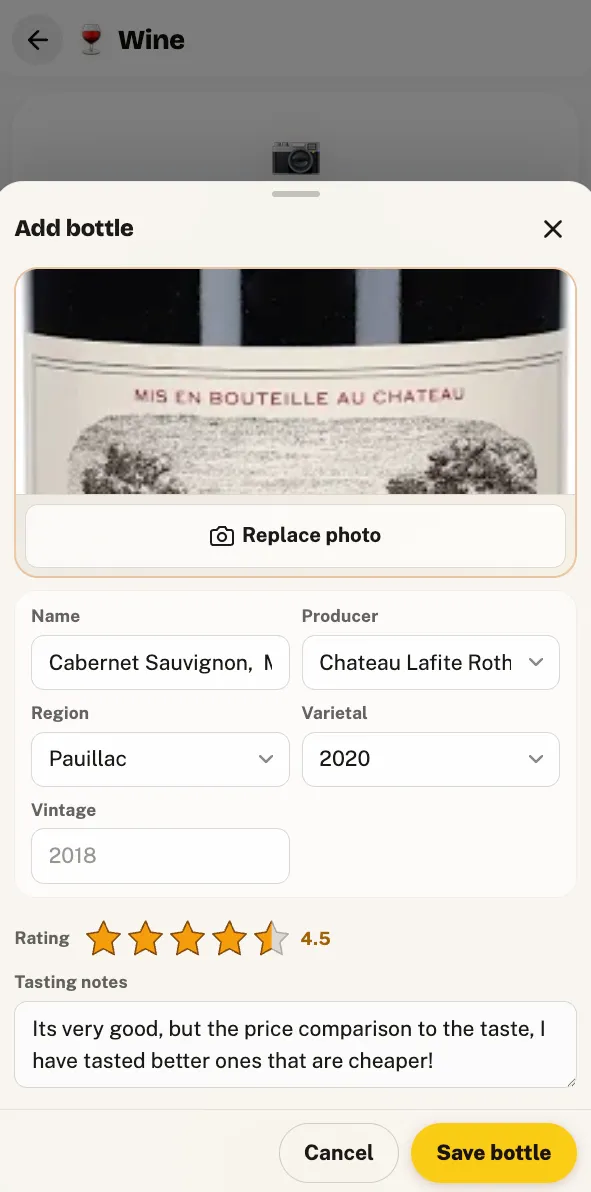
Say the bottle is a 2021 Côtes du Rhône the waiter talked you into — nothing famous, €26 on the list. A note that works looks like this:
"Sweetness 1, acidity 3, tannin 2, body 3, fruit 4, oak 1. Dark berries, a bit peppery, soft enough that everyone at the table liked it. Great with the duck, fine on its own. Would order again anywhere under €30."
No blackcurrant leaf, no "hints of garrigue". Every word is something you actually noticed, and every word does a job for future you: the scores place the bottle on your radar, the pepper detail separates it from a hundred other soft reds, the duck tells you when to order it again, and the price line turns the whole note into a buying rule. Thirty seconds, done before the glasses are cleared. And if a descriptor won't come, skip it — "smooth, liked it, threes across the board" is a legitimate tasting note and infinitely better than the blank you'd otherwise have.
One more, because whites trip people up: a supermarket Picpoul, €8, Tuesday-night fish. "Sweetness 0, acidity 5, tannin 0, body 2, fruit 3, oak 0. Lemony, almost salty, gone in an hour. Perfect fridge wine — buy two next time." Notice the note is doing a different job than the Côtes du Rhône one: nobody needs to remember a €8 Picpoul as an experience, but future you absolutely needs to know which of the six near-identical bottles on that supermarket shelf was the good one. That's the quiet power of scoring the same six axes on every bottle regardless of price — after twenty entries the radar shapes cluster, and you discover the pattern prose never shows you: maybe every wine you loved is high-acid and low-oak, and suddenly the wall of labels at the shop sorts itself.
Wine bars, restaurants, and the bottle you drank there
Most memorable wines arrive at tables, not from your own rack — which is why a wine journal works best inside a restaurant tracker. On Crumble the venue side is free: the wine bar gets a pin and a rating, the wishlist holds the natural-wine place you keep meaning to try, and friends see your finds on the shared map. The bottle's session note references the dinner it belonged to.
Restaurant bottle, home bottle, wine bar: track each differently
Where you drink the wine changes what's worth writing down.
- Restaurant wine — speed wins. The list goes back to the waiter, so capture the label (a photo of the list entry works too), the dish it played against, and the list price. Log it against the restaurant and the dinner context comes free — the note lives with the place you'd order it again.
- A bottle at home — no time pressure, so go fuller: where you bought it and what you paid (shop price is the difference between "nice" and "buy a case"), and all six scores taken over the evening. Wines change as they open — if hour two beat hour one, that's a line worth writing.
- Wine bar or tasting flight — many pours, so shrink each note to survive the volume: one overall score and three words per glass ("sharp, grapefruit, yes"). Give the bar itself its pin and rating, and save the full six-axis treatment for the one pour that earns a whole bottle later.
The mistakes that kill the habit
- Logging too much. A five-paragraph tasting note feels rigorous on bottle one and exhausting by bottle four. Six scores and one line is the sustainable dose — the journal you keep beats the journal you abandon.
- Rating the region, not the bottle. "I love Rioja" is a mood, not data — there are Riojas you'd score a 2. Producer and vintage are the unit; that's why the label matters more than the grape.
- Waiting until you get home. By then the bottle is in the recycling and the list is back with the waiter. Photo now, tidy tomorrow — the capture is the part that can't be recovered.
- Only logging the triumphs. The 2/5 over-oaked Chardonnay teaches your buying as much as the great Douro did. The misses are what sharpen the radar.
These failure modes apply to any food or drink log — our guide to food diary apps covers the general habit — but wine punishes them fastest, because the evidence leaves with the bottle.
Honest alternatives
Vivino is unbeatable for crowd ratings and price comparison at the shelf — point it at a label and see what the world thinks (we've written a fuller Vivino comparison). CellarTracker is the collector's choice: deep cellar management, drinking windows, community tasting notes at scale. Crumble's lane is different: private by default, notes shared with actual friends, and one app where your wine journal lives next to your whisky, coffee, and restaurant map. Plenty of people run Vivino for the shop and Crumble for the memory.
Choosing an app rather than a habit? Start with our roundup of the best wine tracking apps — or, if you're coming from beer and want the check-in loop, Untappd for wine.
Frequently asked questions
How do I remember wines I liked?
Capture the bottle before it leaves the table: photograph or scan the label, score it, add one line about what you ate with it. The label is the part everyone forgets — a week later "that Portuguese red" matches two hundred bottles at the shop. Apps with label scanning (Crumble, Vivino) exist precisely for this moment.
What is the best app for wine tasting notes?
Depends what you want. Vivino is the giant for crowd ratings and price checks; CellarTracker is the serious collector's database. Crumble's free wine add-on fits if you want your wine notes living alongside your restaurant map and other drink journals — shelf, six-axis scoring, shared with friends only, with an AI label scan on Crumble Plus.
What should beginner wine tasting notes include?
Six scores and a sentence. Sweetness, acidity, tannin, body, fruit, oak — each 0 to max — then one honest line ("cherry + vanilla, smooth, would buy again under €15"). Skip the wine-speak; your notes only need to make sense to future you.
Should I track restaurant wines too?
Especially those — restaurant pours are where you meet wines you'd never buy blind. Log the wine against the restaurant (which you're tracking anyway), and the dinner context comes free: the wine, the dish it played against, the place to order it again.