
A cozy cooking app: a little kitchen that grows as you cook
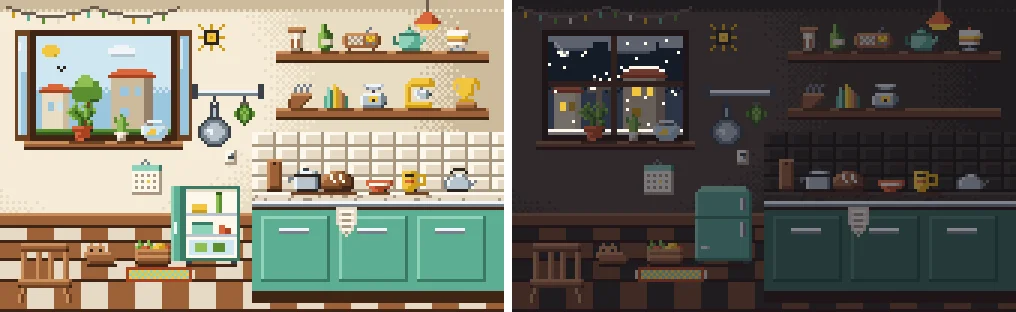
Cozy apps work because they give you a small, calm place that changes when you look after it. Crumble does that for home cooking: you get a pixel kitchen, and every dish you cook and log brings it a step closer to a real, lived-in kitchen, from the first pot to the cat at the table.
This guide walks through what is in the room, what you can tap, and why a cozy reward suits cooking better than streak pressure.
What makes an app feel cozy
The apps people call cozy share a few things: soft art, no shouting, progress you can see, and nothing that punishes you for a slow week. Finch has a little bird you care for by doing self-care tasks. Forest grows a tree while you leave your phone alone. Habitica turns your to-do list into a role-playing game.
All of those are general habit apps. They will track "cook dinner" as a checkbox, but they do not know what you cooked, and a year later they cannot tell you. The Kitchen is the same calm reward, tied to the actual dishes.
Your kitchen grows one object at a time
Open Kitchen from the Browse row and you see a small pixel room. It is drawn from your real count of home-cooked dishes, and 26 objects appear at fixed milestones. Your first dish puts a pot on the counter. The cat moves in at 56. At 100 there is a trophy on the shelf.
| Dishes cooked | What appears |
|---|---|
| 1 to 10 | a pot, a cookbook you actually open, the red mixing bowl, a bread habit, a radio to cook to, something green on the sill, a fridge worth opening |
| 12 to 26 | the good mug, a calendar of dinners, a spice you bought on purpose, a cactus that forgives you, the heavy pan, a proper teapot, decent olive oil |
| 30 to 51 | a rug for cold feet, a kitchen clock, a kitchen scale, a knife block, a crate of market veg, herbs you actually use, a cake on a stand |
| 56 to 100 | the cat moves in (56), string lights (65), a goldfish called Crumb (75), a stand mixer (90), the 100 dishes trophy (100) |
Early objects come quickly, so the room is never empty for long. Later ones are spread out, so the string lights and the goldfish feel earned. Nobody ever loses an object: when new ones were added, the old milestones stayed where they were.
It follows your day and the seasons
The light in the room follows the clock on your phone: a pink dawn from 5 to 8, full daylight until 5 pm, a purple dusk until 9, then night, with the lamp on. This is separate from dark mode, so your kitchen at breakfast looks like breakfast.
Outside the window the tree changes with the month: blossom in spring, full green in summer, orange in autumn, bare branches in winter. Each day gets its own weather. Winter days can bring snow or rain, autumn has its rainy days, summer is mostly clear. The weather holds for the whole day.
The seasons follow northern hemisphere months. If you cook in Sydney or Manila, December still brings snow to the window.
Things you can tap
The kitchen is meant to be poked at for a minute while dinner simmers.
- The cupboards. Three doors open to show cups and plates, jars and a saucepan, and tins.
- The window. It swings open onto the street. By day a bird flies past, at night you might catch a shooting star.
- The lights. Tap the lamp or the switch on the wall and the room goes dim.
- The kettle. It lets off a puff of steam.
- The cat. Once it has moved in, a tap gets you a little heart.
- The chairs. Pull one out from the table. Pull out the right one and the cat walks over and sits on it. Push it back in and the cat hops down.
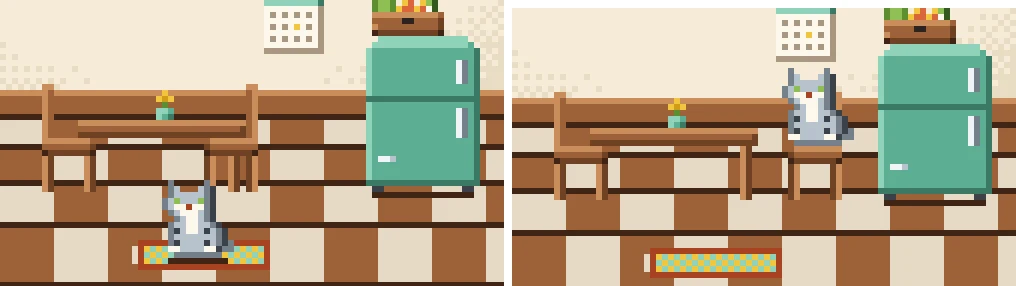
If your phone is set to reduce motion, the animations are skipped and everything still works.
Why cozy beats streak pressure for cooking
Cooking has natural gaps. Leftovers night, a busy week, a trip. A reward that breaks hard on a missed day teaches you to log toast at 11:58 pm. The Kitchen only counts dishes, so a slow week costs you nothing: the room just waits for the next one.
There is no shortcut. The only way to get the cat is to cook 56 dishes, so the room is a picture of how much you really cook. Our guide to the gamified cooking app idea goes deeper into why that matters.
What you keep besides the room
Every dish you log stays in Dishes with your photo, your rating from 0 to 5 in tenth-of-a-star steps, and your notes. Recipes live in the Recipes tab next to it, where you can write one down or pull one from a cooking video and then cook it step by step. See how to save recipes from TikTok for that part.
Home cooking also earns the same XP and keeps your streak like a restaurant visit does, so the kitchen and your restaurant map grow together.
When another app is the better pick
If you want one cozy app for every habit, from water to journaling, a general app like Finch fits better. If you need meal plans or calorie counts, use a nutrition app. The Kitchen is for people who want to cook more and enjoy watching that add up.
Cook something and get your first pot
Frequently asked questions
Is there a cozy app for cooking?
Yes. Crumble has a Kitchen: a small pixel room that gains one of 26 objects at fixed milestones of home-cooked dishes, follows your phone's clock from dawn to night, changes with the seasons, and has things to tap, including a cat that moves in at 56 dishes.
How many things can you unlock in the Crumble kitchen?
Twenty-six. The first, a pot, comes with your first dish. Then a cookbook at 2, the mixing bowl at 3, bread at 5 and so on, up to the cat at 56, string lights at 65, a goldfish at 75, a stand mixer at 90 and a trophy at 100.
Does the kitchen change between day and night?
Yes. The light follows your phone's clock: dawn from 5 to 8, day until 5 pm, dusk until 9 pm, then night. It is separate from dark mode. The season outside the window follows the month and each day has its own weather.
What can you do with the cat?
Tap it for a heart. If you pull out the right chair at the table, the cat walks over and sits on it, and when you push the chair back in it hops down again.
Do I lose kitchen objects if I stop cooking for a while?
No. The room is drawn from your total number of home-cooked dishes, so a quiet week or month takes nothing away. It simply waits for your next dish.
Is the kitchen free?
Yes. The Kitchen, logging dishes and the Recipes tab you write yourself are free. Only some AI extras, like reading a recipe out of a cooking video beyond the free monthly tries, need Crumble Plus.