
Home Cooking Journal Apps: Our Pick and 3 Alternatives
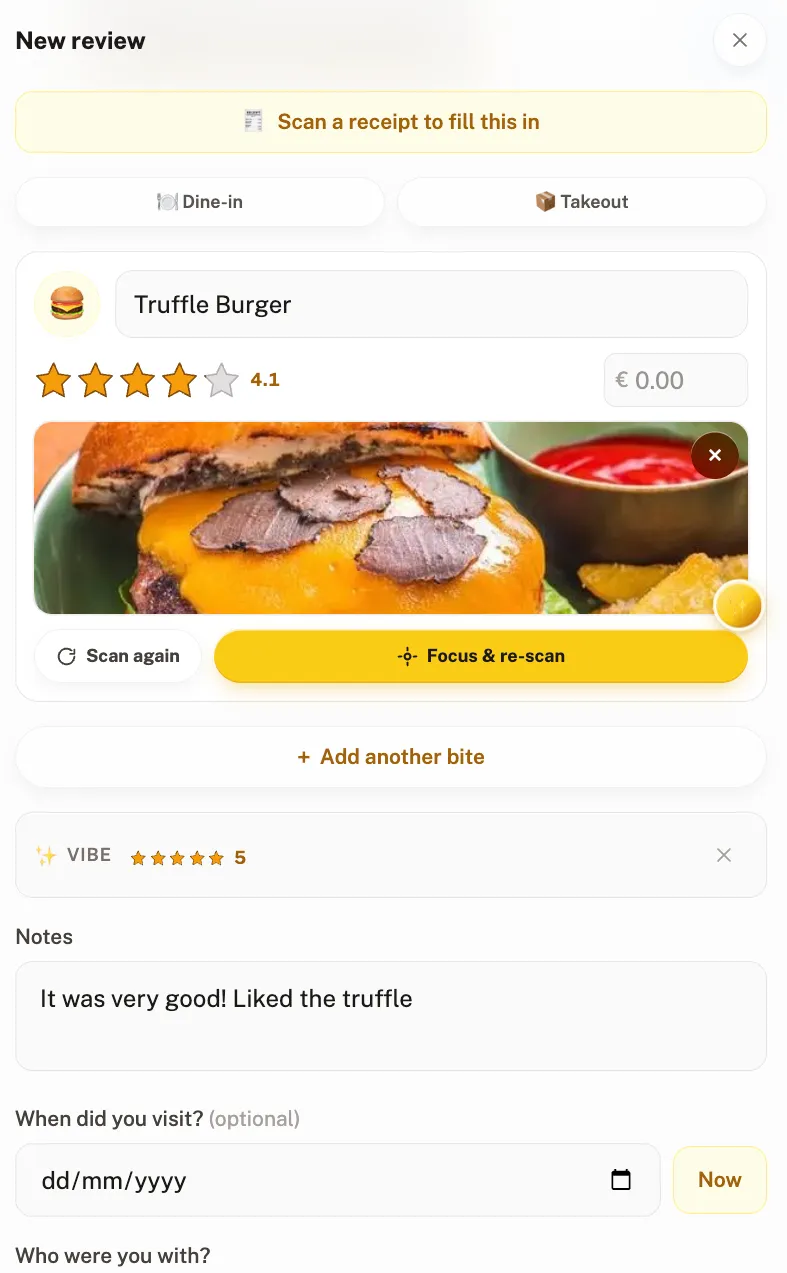
The best cooking journal app is the one that makes logging a meal take twenty seconds, and here is the version of that we think is worth having. Your kitchen can be a place on your map. You put a pin on it, pick an emoji for it, and from then on the thing you cooked on Tuesday sits in the same rated history as the restaurant you went to on Friday. The recipe hangs off the dish. Your friends can open it.
That is the pitch, and the rest of this page is about which cooking journal app does it. Four tools are compared below: Crumble, CookDiary, AteThat! and Paprika, the last one a recipe manager rather than a journal. There are two completely different tools people mean when they say they want to keep track of their cooking, and buying the wrong one is why so many of these apps get deleted after a fortnight.
The first is a recipe manager: somewhere to store recipes you intend to cook, build a shopping list, and plan a week. The second is a cooking journal: a record of what you actually made, how it turned out, and whether you would make it again. Recipe managers are mature and good. Cooking journals are a newer and much thinner category, and it is the one most people are actually describing.
This guide is about the second kind, with an honest note about when you want the first.
The best cooking journal apps at a glance
| Tool | Best for | Platforms | Restaurants too? | Price |
|---|---|---|---|---|
| Crumble | Cooking and eating out in one rated history | Any browser, installable on iOS and Android | Yes, same map | Free |
| CookDiary | Tracking repeat attempts at the same dish | iPhone, iPad, Mac (M1+), Vision | Home cooking focused | Free with in-app purchases |
| AteThat! | Quick meal logging with leftover reminders | iPhone, iPad | Yes, both | USD 0.99 one-time |
| Paprika | Recipes, shopping lists and meal plans | iOS, Android, Mac, Windows | No, it is not a journal | Paid, sold per platform |
Crumble: the dish you cooked, next to the dish you ate out
The thing Crumble does that the others do not is refuse to separate the two halves of your eating. A meal you cooked on Tuesday and a meal you ate out on Friday are the same kind of entry in the same history, rated on the same scale, so your record is of what you ate rather than of where you were.
Marking a review as home-made switches off everything venue-shaped: the entry is called Made at home, no restaurant identity is attached to it, and it uses your home location rather than a searched address. Home-made entries are kept off the shared map layer and their coordinates are not exposed to anyone else, which is the part that matters if the location in question is your kitchen.
Then the bit that makes it a cooking journal rather than a diary: you can attach up to ten recipes to a home-made review. Each one is a title plus either a link or the method typed out as text, up to 5000 characters, so a recipe can be a URL you followed or the version you actually cooked with your own changes in it. Friends can open them.
Ratings are per dish, from 0 to 5 in tenth-of-a-star steps, which matters more for cooking than for restaurants. The difference between your third attempt at a ragu and your fourth is not a whole star, and a five-point scale flattens exactly the progress you are trying to see.
What you actually get, concretely:
- Your home, as a pin with an emoji you choose. A house, a tent, a castle, a circus tent. It is your map, and your kitchen belongs on it.
- Up to ten recipes per dish, each a link or the full method typed out, up to 5000 characters, so the version with your changes in it is the one you keep.
- Photos and a category emoji on every entry, the same as any restaurant dish, so your cooking looks like the rest of your food history instead of a separate list.
- It counts. Cooking at home earns XP and keeps your streak alive exactly like eating out does. The only thing it will not do is unlock a new country flag, because your kitchen is not travel.
- It shows up in your year recap, alongside everywhere you went, so the record of your year includes the food you made and not only the food you bought.
- Friends can cook it. They see the dish, your rating and the recipe, which is a far better way to pass on a recipe than a screenshot in a chat thread.
It runs in any browser and installs on iOS and Android straight from the browser, so there is no app store gate and nothing to pay for. Your map is friends-only by default, and if you share a year recap publicly, home-made entries are stripped of their names automatically.
What doesn't Crumble do?
It is not a recipe manager and we are not going to pretend otherwise. There is no shopping list, no meal planner, no web clipper that imports a recipe from a site, no ingredient scaling and no unit conversion. If any of that is what you came for, the section on Paprika below is the honest answer.
The recipes in Crumble hang off a dish you already cooked and rated. They are a record, not a planning tool. That is a deliberate limit rather than a missing feature, but it is a real limit and it decides whether this is the right app for you.
CookDiary: built around repeat attempts
CookDiary is the closest thing in the category to a dedicated version of what we do for home cooking, and its own framing is the interesting part: it tracks every attempt at every dish, so you can compare your first go at something with your best one and see what changed.
That is a genuinely good idea and it is the right unit for cooking. You log a dish with a photo and a note, it builds into a personal cookbook, and there is AI feedback on top. It runs on iPhone, iPad and Mac, and its own site now links an Android app on Google Play. It is free with in-app purchases, currently listed from USD 3.99 for a week up to USD 69.99 for full access.
Two things to weigh. There is no web version, so it lives on your phone rather than any browser. And it is focused on home cooking, so your restaurant meals live somewhere else, which puts you back to two records. Already using it and weighing a switch? Our CookDiary alternatives page compares the options side by side.
AteThat!: the cheap, fast one
AteThat! is the simplest option here and the only one with a one-time price rather than a subscription: USD 0.99, per its App Store listing. You add a meal with a photo, a rating and a note, and the date and location are saved for you. It covers restaurant dishes and home cooking alike.
Its most distinctive feature is the one nobody else has bothered with: leftover reminders, which is a genuinely practical idea for anyone who cooks in batches. It is iPhone and iPad, with a Mac listing that is marked as not verified for macOS, and there is no web version stated. On Android or want per-dish ratings? See our AteThat! alternatives.
Paprika: when what you wanted was a recipe manager
If you are here because you want to collect recipes and cook from them, Paprika is the answer and none of the journals above are. It organises recipes, builds meal plans and grocery lists, saves recipes from the web through a built-in browser, syncs across devices, scales ingredients to a serving count and converts between metric and imperial.
It runs on iOS, Android, Mac and Windows, and each version is sold separately, so a household on mixed platforms buys more than once. Its own site does not list prices, so we are not going to invent one.
Paprika is the classic of the category, and it is not the only one. FOODIE is the modern take: per its own site it imports recipes from links, photos, Instagram, TikTok and YouTube, sorts them into collections automatically, and adds ingredient search, meal planning and a hands-free cooking mode. It is iOS only with Android and web stated as planned, free up to 10 recipes, and USD 4.17 a month billed annually beyond that. There are several others working the same seam, including Crouton, ReciMe and CookBook, which we have not tested and so will not describe.
The clean way to think about it: an organiser is for the cooking you are going to do, a journal is for the cooking you did. Plenty of people want both, and they do not conflict. Getting this one distinction right is the difference between an app you use for years and one you delete in a fortnight.
Which cooking journal app should you use?
- You eat out as much as you cook, and want one record. Crumble.
- You want to see attempt three against attempt seven. CookDiary, if everyone involved is on Apple.
- You want the cheapest thing that works, and you batch cook. AteThat!
- You want a shopping list and a meal plan. An organiser, not a journal: Paprika if you want the long-running utilitarian one, FOODIE if you save recipes off Instagram and TikTok.
- You cook with someone and want to send them the recipe. Crumble, because the recipe is attached to the dish they can see you rated.
Is it worth rating your own cooking?
Rating a restaurant tells you where to go back to. Rating your own cooking does something different and more useful: it turns a vague sense that something worked into a record you can act on. The lasagne you rated 4.5 with the recipe attached is repeatable. The one you remember as "good, I think" is not.
That is the whole argument for the category, and it is why the tenth-of-a-star scale matters here more than it does for a restaurant list. Cooking improves in increments. If your scale cannot see an increment, it cannot show you improving.
For the method rather than the tools, see our guide on how to track what you cook. If you also keep a record of eating out, keeping track of restaurants covers that half, and the food diary apps comparison covers the wider category.
Log your first home-cooked dish
Frequently asked questions
What is the best app to track home cooked meals?
It depends on whether you also eat out. Crumble keeps cooking and restaurant meals in one rated history, runs in any browser and is free. CookDiary is built specifically around repeat attempts at the same dish and is excellent at that, but it has no web version and its paid tiers are steep for a journal. AteThat! is the cheapest at USD 0.99 one-time and adds leftover reminders.
Is there a free cooking journal app?
Yes. Crumble is free, including per-dish ratings, photos, attaching recipes to a home-made entry, and the friends map. CookDiary is free to download with in-app purchases for its paid tiers. AteThat! is a one-time USD 0.99 rather than free.
Can you save recipes with the meals you cooked?
In Crumble, yes: a home-made review takes up to ten recipes, and each one is a title plus either a link or the method typed out as text, up to 5000 characters. That means you can store the version you actually cooked, with your own changes, rather than only a link to someone else’s. Friends can open them.
Is a cooking journal the same as a recipe manager?
No, and mixing them up is the main reason people abandon these apps. A recipe manager like Paprika stores recipes you intend to cook and builds shopping lists and meal plans. A cooking journal records what you actually made and how it turned out. Crumble is the second kind: no shopping list, no meal planner, no web import, no ingredient scaling.
Is my home address visible if I log home cooking?
Not to anyone else in Crumble. A home-made entry is named Made at home, carries no venue identity, and is kept off the shared map layer, with its coordinates not exposed to other users. The rating, the dish and any attached recipe are what friends see.
Can I track restaurant meals and home cooking in the same app?
Crumble and AteThat! both do. Crumble treats them as the same kind of entry on the same 0 to 5 scale in tenth-of-a-star steps, so one history covers both. CookDiary is focused on home cooking, so restaurant meals would live somewhere else, and Paprika is a recipe manager rather than a journal of either.