
6 Best Coffee Tracking Apps & Journals
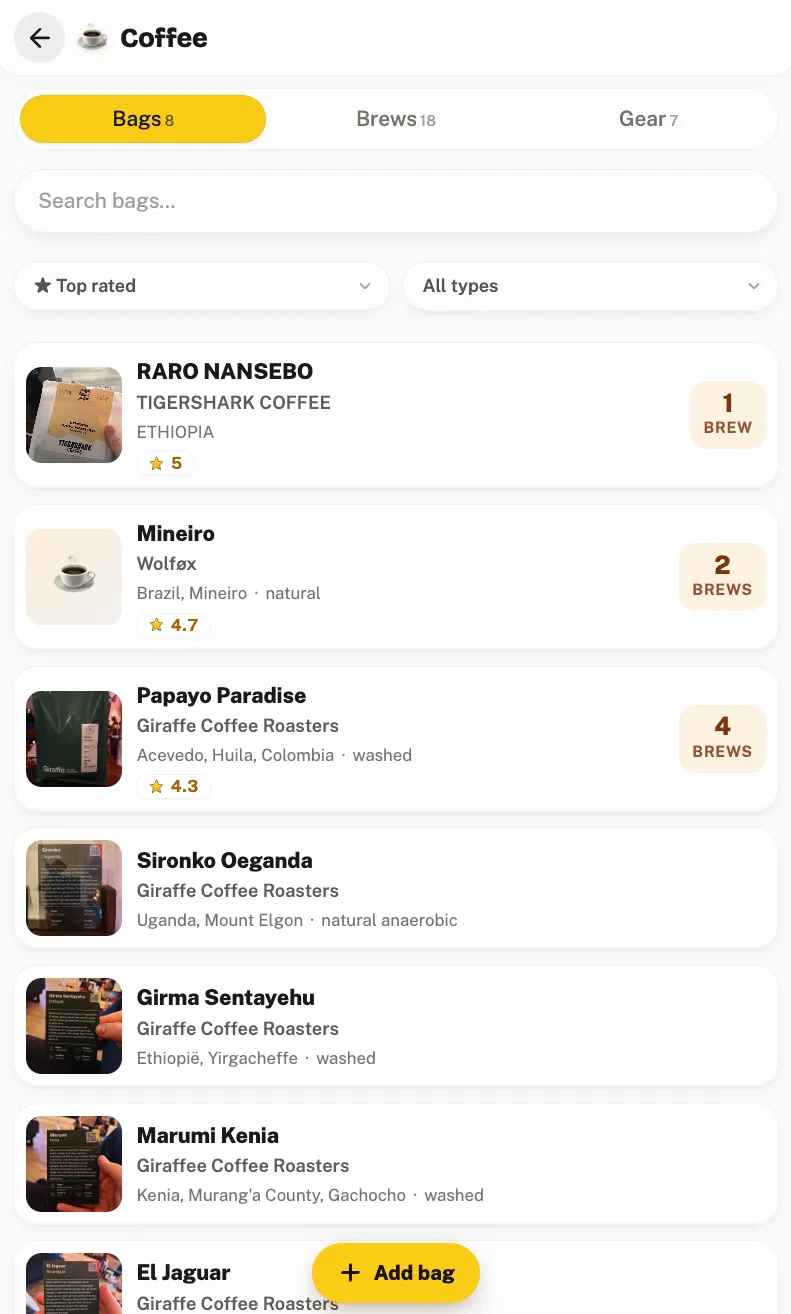
The best coffee tracking app depends on whether you're dialing in a recipe or remembering beans you liked: Beanconqueror, Filtered and Crumble all log brew variables so home baristas can repeat a shot, while Crumble offers a private six-axis coffee tasting journal for logging beans, roasters, and origins and sharing them with friends.
Most "best coffee app" roundups list a handful of apps against each other as if every coffee drinker wanted the same thing. They don't. Someone tuning a grinder to chase 18 g in, 36 g out in 28 seconds has almost nothing in common with someone who just wants to remember which Ethiopian bag from the roaster down the road was worth rebuying, so this guide sorts the apps by who they're actually for, and gives an honest verdict for each group.
First: which kind of coffee tracker are you?
- Home baristas dialing in a recipe want to reproduce a good brew. They need to log dose, yield, shot time, and grind setting and adjust one variable at a time. → Beanconqueror, Filtered or Crumble or Filtered.
- Specialty-coffee tasters care about the bean, the roaster, the origin, and how it actually tasted, and want a record they can compare and share. → Crumble, or Angel's Cup / Coffee Compendium for the blind-tasting angle.
- Casual drinkers just want to remember which bag they liked and avoid rebuying ones they didn't. They need fast capture and simple notes, not a brew calculator. → Crumble or a notes app.
The picks at a glance
| App | Best for | User type | Platforms | Price |
|---|---|---|---|---|
| Beanconqueror | Free, open-source brew log with full extraction variables | Home barista | iOS, Android | Free (open-source) |
| Filtered | Recipe tracking for pour-over and espresso | Home barista | iOS | Free tier + premium |
| Crumble | Private tasting journal with full brew variables and six-axis scores | Taster / casual | Web app (installs on iOS, Android, desktop) | Free |
| Angel's Cup / Coffee Compendium | Blind tasting + community flavor logging | Taster | iOS, Android | Free / subscription boxes |
| Untappd | Beer only, not a coffee tracker | n/a | iOS, Android | Free |
| Notes app / spreadsheet | Zero-setup fallback | Any | Everywhere | Free |
1. Beanconqueror: best free brew log for home baristas
Beanconqueror is the app serious home baristas reach for when they want to dial in a recipe. It's free and open-source, and it logs everything an espresso log app or brew log app needs: the bean and roaster, the grinder and setting, dose in, yield out, brew time, and a taste note for each brew: espresso and filter alike. Because it records extraction variables, you can change one thing at a time and see what it did to the cup, then export your data to keep it.
Trade-offs: it's built for repeatability, not for remembering roasters socially. The interface is dense and data-first, the learning curve is real, and if you don't own a scale and a decent grinder most of its machinery is solving a problem you don't have. There's no social layer; your log is yours alone.
2. Filtered: best recipe tracker for pour-over and espresso
Filtered is a brew-logging and recipe app aimed at people dialing in coffee at home. It stores your recipes (ratio, grind, time, temperature) and lets you tweak and re-save them as you refine a brew, so your best pour-over or espresso recipe is one tap away next morning. It's a cleaner, more guided take on the same job Beanconqueror does.
Trade-offs: it's iOS-first, so Android baristas are left out, and the deeper features sit behind a premium tier. Like Beanconqueror, it's a recipe tool, not a place to remember which café's bag you loved or to share finds with friends; that's a different job, below.
3. Crumble: best private coffee tasting journal
Crumble is a friends-first food and drink tracker, and its coffee journal is built for people who care about the bean as much as the extraction math. You log the bean, roaster, origin, process, and brew method (plus the full brew variables), then score each coffee on six plain flavor axes: a shape you can compare across bags without writing tasting prose. Ratings use the same 0–5 scale with tenth-of-a-star precision as everything else in Crumble.
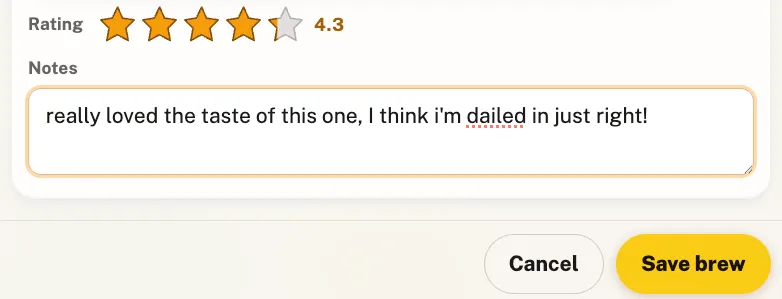
- Private by default. Your journal is shared with the friends you choose and nobody else: no public feed, no paid ads, EU-hosted and GDPR-compliant.
- Cafés live on your map, free, and so is the journal. The free tier covers reviewing places (including coffee shops), the wishlist, the shared friends map, and the tasting journals themselves (coffee, plus wine, whisky, beer, tea, matcha). A planned Crumble Plus tier, not on sale yet, will add an AI label scan that fills in roaster, origin, and process from a photo of the bag, plus AI food scan, unlimited wishlist, uncapped Crumb Hunt, and a daily XP bonus.
- No install required. It's a Progressive Web App: open it in any browser and add it to your home screen, no app store needed.
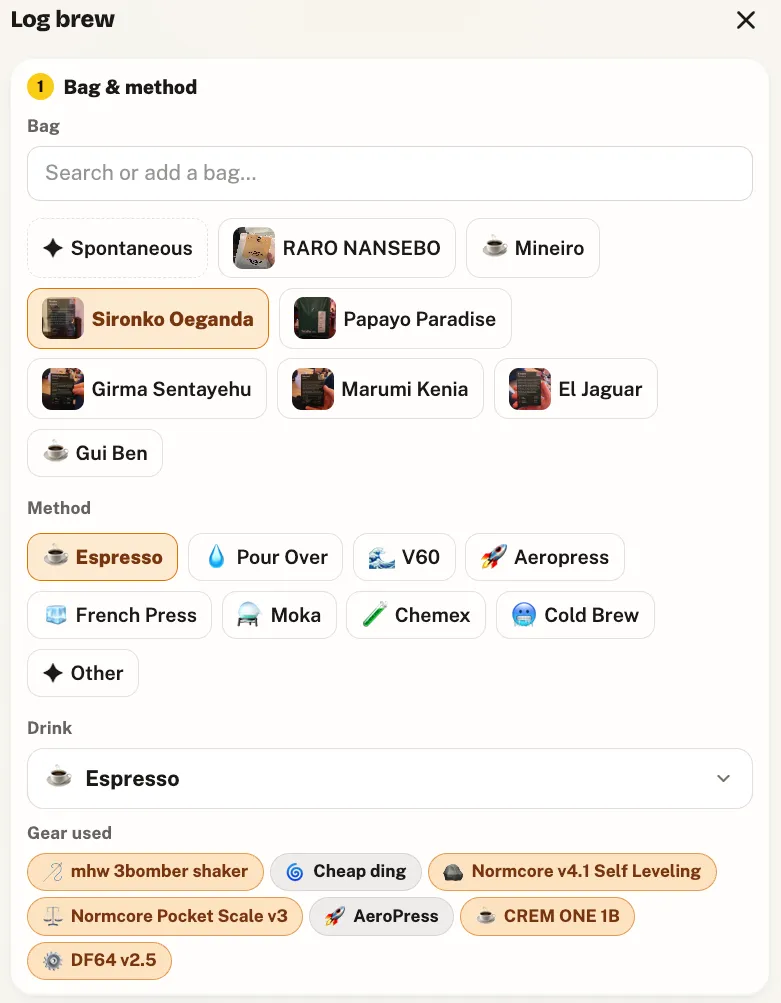
It dials in too. Each brew records dose in, yield out, shot time, temperature, pre-infusion and grind setting, calculates the ratio for you, and remembers the gear you pulled it on: grinder, machine, scale, even a refractometer. Pour-over swaps in bloom and total time. So you can change one variable at a time and reproduce the shot that worked, then score how it actually tasted on the same screen.
Where it's not for you: if you want a dedicated recipe library to browse and re-run (Filtered's model) or the deepest open-source brew tooling, the apps above are more specialised. Crumble puts the dial-in data and the tasting note in one journal rather than treating recipes as the product. For the full method, see how to track specialty coffee.
4. Angel's Cup / Coffee Compendium: best for blind tasting
Angel's Cup built its following on blind tasting: you taste a coffee without knowing what it is, log the flavors you pick up, and compare your notes against the roaster's and the community's. Its Coffee Compendium side leans into that community flavor-logging angle, turning tasting into a game of calibrating your palate against everyone else's.
Trade-offs: the experience has historically been tied to its subscription tasting boxes and a specific community, so it's less of a general-purpose journal you point at any bag you own and more of an app for a particular way of learning to taste. If blind tasting isn't your thing, a straightforward tasting journal (Crumble) fits daily use better.
5. Untappd: the "Untappd for coffee" that isn't
People search for an "Untappd for coffee" constantly, and it's worth being clear: Untappd is a beer check-in app and doesn't track coffee at all. The check-in-and-rate model is exactly what people want for coffee, which is why the search exists, but Untappd itself won't do it.
Trade-offs: using it for coffee simply isn't possible. The closest fits are Beanconqueror for a brew log or Crumble for the social, tasting-note side. We unpack the whole question in Untappd for coffee.
6. A notes app or spreadsheet: the zero-setup fallback
Plenty of coffee journals start as a note titled "beans I liked". It costs nothing, syncs everywhere, and captures the essential fact: this bag, this roaster, yes or no. A spreadsheet adds columns for origin, process, brew method, and score if you're disciplined.
Trade-offs: no label capture, so every entry is typed by hand; no structure, so a few months in you have a wall of inconsistent text; and nothing connects to a map, a rating scale, or friends. It's where coffee tracking begins, and outgrowing it is usually what brings people to this page.
How to choose
- You're dialing in espresso or pour-over → Beanconqueror for a free, full open-source brew log; Filtered if you want a cleaner recipe app on iOS; Crumble if you want the dial-in data and the tasting score in one journal.
- You want to remember beans, roasters, and origins → Crumble's free six-axis tasting journal.
- You want to train your palate by blind tasting → Angel's Cup / Coffee Compendium.
- You track beer on Untappd and wondered if it does coffee → it doesn't; see Untappd for coffee.
- You're one bag a month → a notes app is fine. Upgrade when it stops scaling.
Whichever you pick, log the coffee while the cup is in front of you: thirty seconds with the bag in hand beats reconstructing a roaster's name from memory. The same habit carries across your shelf: if you're serious about the tasting side, see how to track specialty coffee.
How we chose these apps
We build a food and drink tracker ourselves, which means two things: we know this category from the inside, and we have an obvious conflict of interest. To keep the list honest, every competitor description is drawn from the app's own published materials (its website, App Store or Play Store listing), not from our opinion of it. We included an app when it (a) keeps a record of coffees you've personally brewed or drunk, (b) attaches your own recipe, rating, or note to each one, and (c) offers a usable free tier. We then sorted by user type rather than forcing a single ranking, because "best coffee app" genuinely has different answers, and where another app is the better choice for a segment, we say so plainly: for reproducing an espresso recipe, that app is Beanconqueror.
Frequently asked questions
What is the best app to track coffee?
It depends on whether you're dialing in a recipe or remembering beans. Home baristas tuning espresso or pour-over can use Beanconqueror, Filtered, or Crumble: all three log dose, yield, time, and grind so you can repeat a good shot. Crumble's free journal adds the part the recipe tools skip: six-axis tasting scores per brew, kept among chosen friends instead of on a public feed. If you just want to remember which bag you liked, Crumble or a plain notes app both work.
Is there an Untappd for coffee?
Not exactly. Untappd itself is beer-only and doesn't track coffee. The closest fit depends on what you mean: Beanconqueror for a brew log, or Crumble for the social, tasting-note side where you rate beans and share them with friends. We cover the whole question in our guide to Untappd for coffee.
How do I log espresso shots?
Use a brew-tracking app built for it. Beanconqueror and Filtered let you record dose (grams in), yield (grams out), shot time, grind setting, and a taste note for each pull, so you can adjust one variable at a time and reproduce the shot that worked. Crumble records the same extraction variables: dose, yield, shot time, temperature, pre-infusion and grind, alongside a six-axis score for how the shot actually tasted, so the recipe and the verdict live together.
Is there a free coffee journal app?
Yes. Beanconqueror is free and open-source, and Crumble's six-axis coffee tasting journal is a free add-on, like its wine, whisky, beer, tea, and matcha journals. In Crumble you score each coffee on six plain flavor axes and log the bean, roaster, origin, and brew method at no cost. The optional Crumble Plus tier, planned but not on sale yet, will add an AI label scan that fills in roaster and origin from a photo of the bag.
What app tracks coffee beans and roasters?
Crumble logs the bean, roaster, origin, process, and brew method for each coffee, lets you rate it on six flavor axes, and records the brew itself: dose, yield, shot time, temperature, pre-infusion, grind, and the gear you used, then shares it privately with friends. Beanconqueror also stores beans and roasters as part of its brew log, and goes deeper as a dedicated open-source recipe tool. Crumble's advantage is keeping the dial-in data and the tasting note in one place.
Start your coffee journal today
Crumble's free tier puts cafés on your map, your wishlist in order, and the six-axis coffee journal on your shelf, so the next great bag doesn't fade into "that Ethiopian one, I think".