
How to Export Your Vivino Wine List
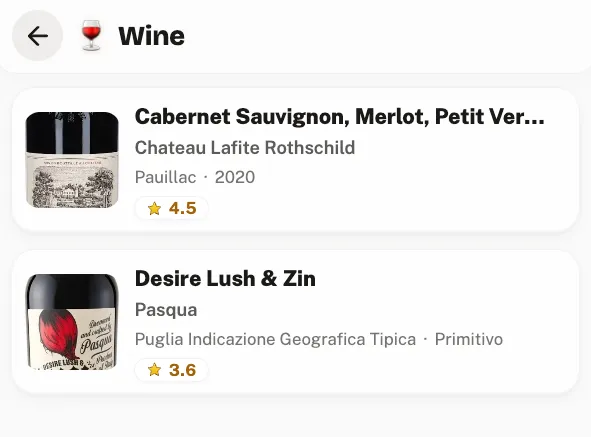
You can export your Vivino wine list in full, and unlike most drink apps Vivino does not charge you for it. What it does do is bury the option and take its time producing the file.
Here is the route, what comes out, what does not, and how to get the result somewhere you control.
Export your Vivino wine list, step by step
- Log in to Vivino on the web. As with most of these exports, this is a desktop job rather than an app one.
- Click your profile icon, top right, and open Settings.
- Scroll to the bottom and look for the export option. Vivino has described this as an export of your cellar list, and third-party guides place it under an account management tab, so check both if the first place you look comes up empty.
- Start the export and walk away. It is reported to be slow, sometimes very slow relative to the number of wines. You can close the tab and come back for it.
- You get a CSV, commonly delivered inside a ZIP archive. Unzip it before uploading anywhere.
What the export contains
The useful part is that Vivino exports your own judgements, not just a list of labels: your rating, your review text, the vintage and when you scanned it.
| Field | What it is | Survives an import? |
|---|---|---|
| Wine name | The wine | Yes, and it is required |
| Winery | Who made it | Yes |
| Region, Country | Where it is from | Yes, combined into an origin |
| Vintage | The year | Yes |
| Your rating | Your score out of 5 | Yes, at full precision |
| Your review | Your tasting note | Yes |
| Scan date | When you logged it | Yes, the history keeps its dates |
| Photos | Label shots | No, they do not come through |
| ABV | Not in the export | No |
Two honest gaps. Photos do not transfer, so your label shots stay in Vivino. And there is no ABV in the file, so imported wines arrive without it. Neither is a dealbreaker for a rating history, but you should know before you assume the move is lossless.
Importing your wines into Crumble
Unzip the archive and upload the CSV as it is. Nothing to rename, no columns to add, no template to match. Detection keys on the winery and wine-name columns.
Wines land in the wine tracker rather than on your map, because a bottle is not a place. Each wine becomes an entry carrying the winery, the region and country as its origin and the vintage, and each time you logged it becomes a dated session underneath with your score and your tasting note.
So a wine you rated three times across four years arrives as one wine with three dated sessions, which is the shape that lets you see whether a vintage improved or your taste moved. A flat list of rows cannot show you that.
Limits: 4 MB per file, 2000 rows parsed, 500 written per commit. Nothing is written until you commit, and the preview shows what was detected first.
What happens to your ratings
Vivino scores to a decimal on a 5-point scale, the same 0 to 5 range Crumble uses. Imported scores keep their precision (up to two decimals, so a 4.2 stays a 4.2) and anything above 5 is capped at 5. Nothing is rounded to half stars.
Export even if you are staying
The strongest reason to run this export has nothing to do with switching apps. A tasting note you wrote in 2019 exists in exactly one place, on someone else's server, under terms that can change. Wine ratings accumulate slowly and are impossible to reconstruct: you cannot go back and re-taste four hundred bottles.
Run the export once a year and keep the CSV. It costs nothing and it is the only copy you actually own.
If you are weighing a move, our Vivino alternatives comparison is the honest version, including where Vivino is still the better tool. How to track wine covers the method whichever app you land on.
Same walkthrough for the other two: exporting Untappd check-ins and exporting Google Maps saved places.
Frequently asked questions
How do I export my wine list from Vivino?
Log in to Vivino on the web, open your profile icon at the top right, go to Settings, and look for the export option, which Vivino has described as exporting your cellar list and which third-party guides place under an account management tab. Start it and come back later: the export is reported to be slow. You get a CSV, commonly inside a ZIP.
Does Vivino charge for exporting your data?
No. Unlike Untappd, which puts its export behind the paid Insiders tier, Vivino's export is available on a normal account. The cost is time rather than money, since building the file can take a while.
What is in a Vivino export?
The wine name, the winery, region and country, the vintage, your own rating, your review text and the date you scanned it. That means your judgements come with you rather than just a list of labels. Photos and ABV are not included.
Do Vivino photos transfer when you import?
No. Label photos stay in Vivino, because they are not in the export file. Everything else, the wine, winery, origin, vintage, your score, your tasting note and the date, imports normally.
Can I import my Vivino wines into another app?
Yes, if it reads Vivino's columns. In Crumble you unzip the archive and upload the CSV as-is. Wines land in the wine tracker rather than on the map, and repeat ratings of the same wine stay grouped as dated sessions under that wine, so you can still see how your view of a bottle changed.
Should I export even if I am not switching apps?
Yes, and this is the strongest reason to do it. Tasting notes accumulate over years and cannot be reconstructed: you cannot re-taste four hundred bottles. The export is free, so running it once a year and keeping the CSV gives you the only copy of that writing you actually control.