How to add TikTok places to Google Maps
Google Maps has no TikTok import. There is no button that reads a TikTok link and drops the restaurant on your map. To add a TikTok place to Google Maps, you find the place name in the video (caption, on-screen text, location tag or comments), search that name in Google Maps, tap Save and pick a list such as "Want to go". It takes about a minute per place and works the same on iPhone and Android.
If you save a lot of food videos, the slow part is step one: digging the name out of a 40-second clip. Further down we show a faster route where Crumble reads the link and finds the named places for you. We also say plainly what it does not do: it saves into Crumble, not into your Google Maps lists.
The short answer: TikTok and Google Maps don't talk to each other
A TikTok bookmark saves the video into your Favorites. Google Maps saves a place into a list. Nothing connects the two: pasting a TikTok link into the Google Maps search bar does not find the restaurant, and TikTok has no "send to Google Maps" option for a whole video.
What TikTok does have is location tags. According to TikTok's help center, creators can add a location to a post "depending on your region", and tagged businesses such as restaurants appear on the post, where you can tap them. That tag is often the quickest way to get an exact name. But not every creator adds one, and some locations can't be tagged at all, so you still need a fallback.
Step 1: find the place name in the TikTok
Everything depends on getting the exact name. Check these, in this order:
- The location tag. Look for a place name on the post, near the caption. Tap it to see the place TikTok has on file. Write down the name and the city.
- The caption. Food creators usually name the spot, often with an @ handle or a hashtag. A handle like @lauraspizzeria is a strong hint, but search the real name, not the handle.
- On-screen text. Pause the video. Names often flash up for a second at the start or the end.
- The comments. Someone has almost always asked "where is this?". Look for the creator's own reply first.
- The storefront. As a last resort, pause on the sign or a menu. A street name plus a sign is usually enough for Google Maps.
If none of these give you a name, the video is not worth more of your time. A place you can't name is a place you can't find later either.
Step 2: save it in Google Maps (iPhone and Android)
Saving works the same way on both phones: search the place, tap its name or address at the bottom, tap Save, then choose a list. The only real difference is how you get the link out of TikTok if you use a helper app, which is in the last row.
| Step | iPhone | Android |
|---|---|---|
| 1. Get the name | Location tag, caption, on-screen text or comments in TikTok | Same |
| 2. Search | Open Google Maps, type the name plus the city | Same |
| 3. Open the place | Tap the place's name or address at the bottom | Same |
| 4. Save | Tap Save, pick a list, or tap New list (plus icon) | Tap Save, pick a list, or tap New list |
| 5. Find it later | Tap You and open the list | Tap You and open the list |
| Optional: share the list | You, More next to the list, Share list (or Invite collaborators) | You, open the list, tap Share (or Invite collaborators) |
| Faster route with Crumble | Copy the TikTok link and paste it into Crumble's Find spots | Install Crumble from Chrome, then in TikTok tap Share and pick Crumble |
Which list? Google Maps comes with default lists including Want to go, Favorites and Travel plans. For TikTok finds, a new list per city works best: "Lisbon from TikTok" is easier to use on a trip than 300 places in "Want to go". When you create a list on Android, Google lets you pick Private or Shared; a shared list can be opened, and optionally edited, by anyone with the link.
Tip: add a note to the saved place ("the cardamom bun from that TikTok"). Three months later the pin alone will mean nothing to you.
The same works for Instagram Reels and YouTube Shorts
Instagram Reels to Google Maps is the same job: Instagram also has location tags, and the caption and comments are usually where the name is. There is no Reel import in Google Maps either. For the Instagram side in more depth, see how to save restaurants from TikTok and Instagram.
The faster route: let Crumble find the places for you
The manual method is fine for one restaurant. It falls apart with a video like "10 places to eat in Lisbon", where you would pause and type ten times. That is the problem Crumble's Find spots tool solves.
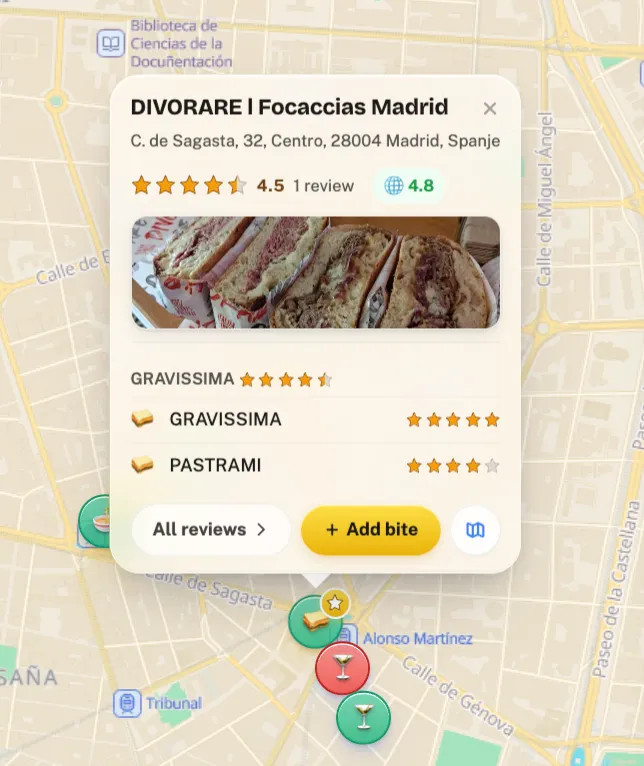
You give it the link to a TikTok, Instagram post or Reel, or a YouTube video or Short. Crumble reads what the post says and lists every food or drink place it names, up to 30 per post. For TikTok it reads the public caption and TikTok's own auto-subtitles, and for photo slideshows it reads the slides. Each name is matched to a real place with an address, shown as a checklist ("Found 8 spots in Lisbon"). You untick anything you don't want and tap Like to save the rest.
- On Android: install Crumble from Chrome (it is a web app). It then shows up in the share sheet: in TikTok, tap Share and choose Crumble.
- On iPhone: there is no share-sheet option, because Crumble has no native iOS app. In TikTok tap Share, copy the link, and paste it into Find spots.
- On a computer: paste the link into "Link to the post" and tap Find spots.
What it does not do (read this before you sign up)
- It does not save into Google Maps. Spots go into Crumble's own wishlist (Liked) or a wishlist folder you choose. Google offers no way for an outside app to add places to your Google Maps lists.
- It opens Google Maps for directions. Every saved spot has a directions button that opens Google Maps with that pin as the destination. So you plan in Crumble and navigate in Google Maps.
- It only finds places that are named. The name has to be in the caption, subtitles or slides. A restaurant that is only shown, never named, can't be found. It does not analyse the frames of normal TikTok videos.
- Some matches will be missing. Crumble matches names against its own places database (Foursquare Open Source Places and OpenStreetMap), not Google's. Unmatched names show as "Couldn't find this one on the map".
- Free has limits. 3 video scans a month, and only scans that find something count. The wishlist holds 2,000 places. Plenty of daily scans, plus a web lookup for missing spots, are part of Crumble Plus (free 30-day trial, no card).
Privacy, briefly: only the link is sent. Crumble's server reads the public post, nothing is uploaded from your phone, and no video or audio is stored. Private posts can't be read.
A hybrid that keeps Google Maps
If you want the places in Google Maps no matter what, you can still use Crumble for step one. Run the link through Find spots, read the names and addresses it finds, and search those in Google Maps to save them there. It turns ten pauses into one checklist. For apps that do this job differently, see our comparison of apps to save restaurants from TikTok.
Manual vs. Crumble: which one to use
| Google Maps by hand | Crumble Find spots | |
|---|---|---|
| Reads the TikTok link | No, you find the name | Yes: caption, auto-subtitles, slideshow slides |
| Where the place is saved | Your Google Maps list | Crumble's wishlist (Liked or a folder) |
| Directions | Built in | Opens Google Maps directions |
| Videos with many places | Slow: one search per place | Up to 30 names per post in one checklist |
| Place data | Google's listings, reviews and hours | Foursquare Open Source Places and OpenStreetMap |
| Cost | Free | Free: 3 scans a month. Plenty every day with Crumble Plus (free 30-day trial) |
When you should just stay with Google Maps
Honestly, many people should. Stay with Google Maps alone if:
- You save one or two places a month. The manual method is a minute each, and you need no new account.
- Your whole travel planning already lives in Google Maps lists, and the people you share them with use Google Maps too.
- You rely on Google's reviews, photos and opening hours when you pick where to go. Crumble's place data comes from different sources and can miss small or new places.
Crumble makes more sense when you save often, when videos list many places, or when you want a food wishlist separate from the rest of your Google Maps pins. Our Google Maps lists alternative guide goes deeper into that trade-off, and if you ever want your Google Maps saves out, see how to export Google Maps saved places.
Troubleshooting
| Problem | What to do |
|---|---|
| Google Maps shows several places with the same name | Add the city or neighbourhood to the search. Compare the photos with the video before you save. |
| The location tag is a city, not a restaurant | The creator tagged the area only. Go back to the caption and comments. |
| The place in the video looks closed | Check the opening hours and recent reviews in Google Maps before you go. Food TikToks can be years old. |
| Crumble says "We couldn't read this post. It may be private or removed." | The post is private or gone. Use the manual method with whatever name you can find. |
| Crumble found the names but some are greyed out | Those names are not in Crumble's places database. Search them in Google Maps by hand. |
| Crumble says "This post isn't about places to eat or drink" | The post is a recipe, news or similar. Nothing is counted against your free scans. |
Frequently asked questions
Can I import TikTok saves into Google Maps?
No. Google Maps has no TikTok import, and TikTok Favorites can't be sent to a Google Maps list. You add each place yourself: find the name in the video, search it in Google Maps, tap Save and choose a list. Tools like Crumble can read the link and find the names for you, but they save into their own app.
How do I save a TikTok restaurant to Google Maps on iPhone?
Find the restaurant name in the TikTok location tag, caption or comments. Open Google Maps, search the name plus the city, tap the place's name at the bottom, tap Save and pick a list like Want to go, or tap New list. The Android steps are the same.
Does tapping a TikTok location tag open Google Maps?
Tapping a tagged location opens the place on TikTok, not your Google Maps list. Use the tag to get the exact name and city, then search that in Google Maps and save it. Location tags depend on your region, and not every creator adds one.
How do I add an Instagram Reel restaurant to Google Maps?
The same way: check the Reel's location tag, caption and comments for the name, then search it in Google Maps and tap Save. Crumble's Find spots also accepts Instagram post and Reel links, but it reads only the caption there, not speech or the location tag.
Does Crumble add places to my Google Maps lists?
No. Crumble saves the spots it finds into its own wishlist. Each saved spot has a directions button that opens Google Maps, so you can navigate there. If you want the places in a Google Maps list, use the names and addresses Crumble found and save them in Google Maps by hand.
Is Crumble's Find spots free?
Yes, with a limit: 3 video scans a month on a free account, and only scans that find places count. Plenty of daily scans and a web lookup for missing spots are part of Crumble Plus, which you can only get through a free 30-day trial with no card.
Stop pausing videos to read signs
Paste a TikTok, Reel or Short into Crumble and get the named places as a checklist. Save them to your wishlist and open any of them in Google Maps when it's time to go.