
Restaurant Map App: 7 Best Apps to Pin Every Place You Eat
A restaurant map app pins the restaurants you have been to and the ones you want to try on one personal map. Crumble, Zest, Mapstr, Google Maps lists, Beli, Truffle and MapBite all do it; the right one depends on whether you want ratings on the pins, a map shared with friends, and Android, iPhone or web access.
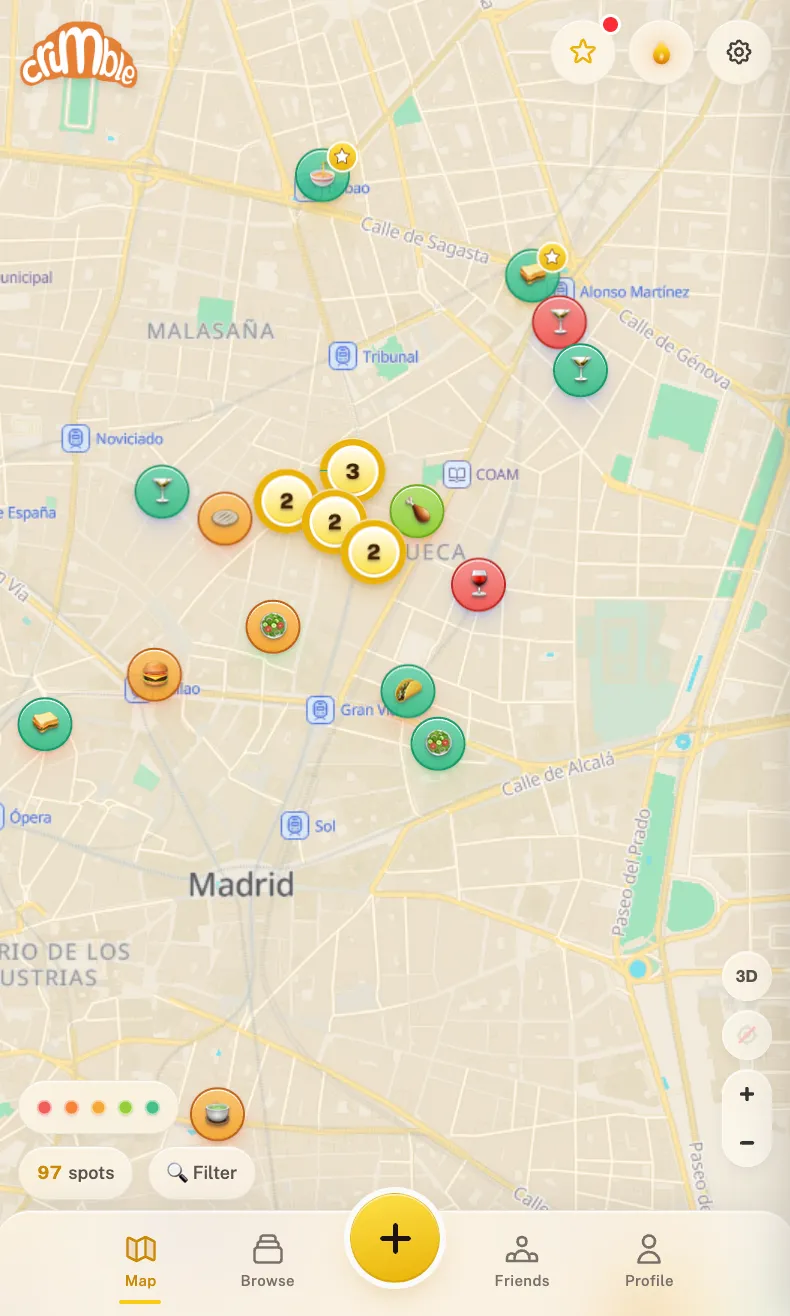
A map beats a list because you rarely ask "what was that place called?" in the abstract; you ask it on a street corner. A map answers "what is good near here?" from your own memory instead of strangers reviews. Below: the apps that do it well, how to choose, and a five-minute setup.
Which restaurant map apps are worth using?
| App | Pins show | Been vs. want to try | Platforms | Export | Price | Get it |
|---|---|---|---|---|---|---|
| Crumble | Your rating (per dish), friends spots | Yes, wishlist clears itself when you review | Any browser; installs to the home screen on iPhone and Android | Machine-readable export on request (GDPR) | Free | Open in browser |
| Zest | Places you paid at, friends regular spots | Visits fill in from a linked card | iPhone | Not advertised | Free | App Store |
| Mapstr | Custom tags with your own colors | "To try" and "Tried" marks | iOS, Android, web (adding places on web needs Plus) | CSV and GeoJSON | Free up to 300 places; Mapstr Plus for unlimited | mapstr.com |
| Google Maps lists | List icon per place | Separate lists (e.g. "Want to go") | Everywhere | Google Takeout CSV (no coordinates) | Free | Google Maps |
| Beli | Ranked score from your comparisons | Been and Want to Try lists | iOS, Android | Not advertised | Free | beliapp.com |
| Truffle | Your and your friends restaurants | Favorites and to-dos | iOS, Android | Not advertised | Free download, optional subscription | App Store · Google Play |
| MapBite | Green (visited) and orange (want to try) pins | Yes, by pin color | iPhone, iPad, Apple-silicon Mac | Not advertised (iCloud sync) | Free | App Store |
If what you really want is a rating system or a dining diary and the map is secondary, our best restaurant tracking apps comparison is the better starting point. This page is about the map.
Looking for restaurants near you instead?
If you want a map of restaurants around you right now, rated by other people, that is a discovery app: Google Maps, Apple Maps and Yelp do that job, with opening hours and reviews from strangers. Every app on this page does something different. It maps your own places, the ones you have eaten at and the ones you have saved, so the map reflects your taste rather than the crowd's.
What makes a good restaurant map app?
A good restaurant map app shows places you have been and places you want to try as visibly different pins, puts your own rating on each pin, lets you choose who sees the map, runs on every device you use, and lets you export your data. The differences between apps only show up a year later, at two hundred pins:
- Been and want-to-try on the same map, visibly different. If the app treats a place you loved and a place you never visited the same, the map turns into noise.
- Your verdict on the pin. A rating, or at least a color you control, tells you whether to go back.
- Personal or shared. Decide who should see your pins (you, friends, everyone) before you add five hundred of them.
- The platforms you actually use. Several apps here are iPhone-only or phone-only; check this first if you mix Android and iPhone or plan trips on a laptop.
- A way out. Pins are years of memory. Prefer an app that exports to CSV or GeoJSON, or at least gives you your data on request.
Crumble: a food map shared with your friends
Crumble is a social food map. Every restaurant you review becomes a pin, and the review is not a single star but a rating for each dish you ordered, on a 0 to 5 scale with tenth-of-a-star precision (★ 4.2), plus notes and photos. Places you want to try go on a wishlist with folders, and a wishlisted place clears itself the moment you review it, so the two halves of the map never drift apart.
The second layer is your friends. Their spots appear on your map too, filtered to places you have not tried yet, so the map is always showing you something new. By default only friends you have accepted can see your pins (you can opt into a public profile or share a link); there is no public feed or ranking, no ad networks or ad trackers, and your data isn't sold. Free maps can show pins marked Sponsored, which never change a rating or search order. The data sits on servers in the EU.
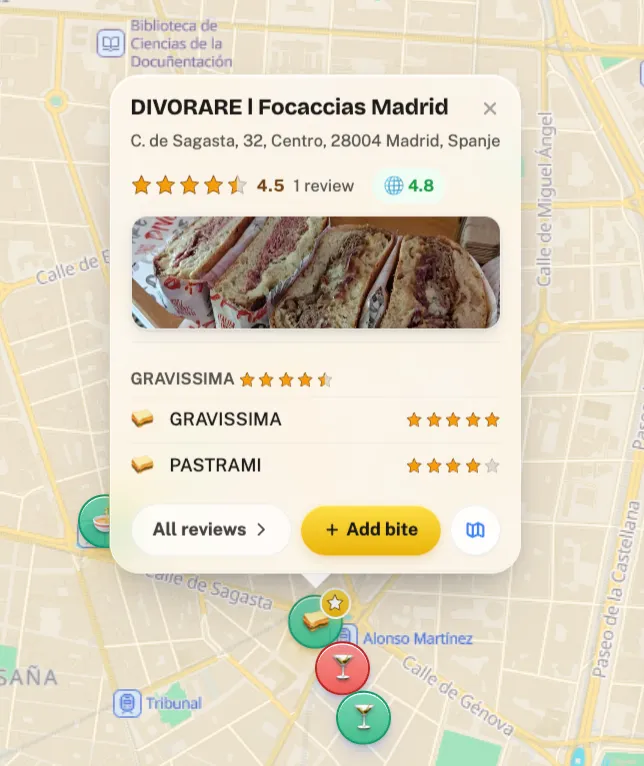
It runs in any browser, so the same map works on iPhone, Android and a laptop, and it installs to your home screen on iPhone and Android as a web app. Places without a listing can be added by dropping a pin, and home-cooked dishes keep your home location visible only to you. If you have years of Google Maps saved places, you can export them with Google Takeout and import them as wishlist pins (upload the GeoJSON file, which keeps coordinates; the free wishlist holds 50 places). Google reviews are not imported, so re-add the ones you care about by hand, with the date you visited.
Where it falls short: Crumble is food only. If you also want to pin museums, hiking trails and shops, a general place-saver suits you better. A native iOS app is still in development, so on iPhone it runs as a home-screen web app for now, and there is no self-serve file export yet: you get a machine-readable copy of your data on request.
Start your restaurant map free
Zest: a map that fills itself from your card
Zest calls itself "the restaurant map that builds itself", and it is the only app here that pins places from your payments, without you logging anything. According to its App Store listing, you link a card once through Plaid with read-only access; Zest sees the names of the places you paid at, not the amounts, and maps the restaurants, cafés, bars and bakeries you have visited going back up to two years. On top of that it shows your friends spots, especially the ones they keep returning to, and you can build and share lists.
Trade-offs: as of October 2026 it is iPhone only and free. A card only knows where you paid, so places a friend paid for, or a dish you would never order again, do not show up on the pin. And because it reads your transactions, check that you are comfortable with its App Store privacy label, which lists payment info and precise location among the data linked to your identity.
Mapstr: a color-coded map of everything you save
On the map, Mapstr is the most customizable app here. Pins take the colors of the tags you invent, so a "sushi" tag in red and a "date night" tag in purple turn your city into a color chart you read at a glance, and you can resize the markers. Places are marked "To try" or "Tried", the Mapstr FAQ says the map stays readable without an internet connection, and you can share it as a link that opens in any browser. Mapstr Plus can overlay the maps of people you follow onto yours.
It is not limited to food: viewpoints, bookshops and beaches pin the same way. The free plan holds up to 300 places, and the FAQ describes an export that arrives by email as CSV and GeoJSON files. Trade-offs: adding places from the web version is reserved for Plus subscribers, and a rating applies to the whole place, never to a single dish. Thinking of leaving it? We compare the options in Mapstr alternatives.
Google Maps saved lists: the map you already have
Google Maps lets you save any place to "Want to go", "Favorites" or a custom list with its own icon, add a short note, and share or co-edit a list with friends. Saved places show up on the map you already navigate with, on every platform, which makes it the zero-effort way to start.
Trade-offs: a saved place has no rating of your own, and nothing changes when you actually go, so after a few years "Want to go" fills up with places you have long since visited. Export through Google Takeout produces CSV files without coordinates. When it stops scaling, see our Google Maps lists alternatives.
Beli: a map of your rankings
Beli builds a ranked list out of head-to-head comparisons ("better or worse than this place?"), and its App Store listing describes "ranked lists and maps of everywhere you've been and want to try", alongside where your friends are eating. It is on iOS and Android and has a large community, especially in big US cities.
Trade-offs: the map is a view of the ranking, not the center of the app, and the experience leans social with a feed and leaderboards. As of October 2026 there is no web version.
Truffle: a shared map with friends, on your phone
Truffle is a restaurant tracker whose App Store listing promises that you can "see all your and your friends tracked restaurants on the Truffle map". Its website says that any restaurant you post in an Instagram Story is tracked for you automatically, which fills the map without extra typing. The download is free; as of October 2026 the US App Store lists optional subscriptions at $1.99 a week, $4.99 a month or $29.99 a year.
Trade-offs: phone-first (iOS and Android; the iPad app also runs on Apple-silicon Macs), with no web version, and it deliberately avoids rankings, so your pins do not carry a score.
MapBite: a simple private food map for Apple devices
MapBite is a small, focused app that does almost exactly what the search term says: save restaurants, cafés and bars with ratings, photos, notes and tags, and see them on a full-screen map with green pins for places you have visited and orange pins for places you want to try. One tap opens a place in Waze, Google Maps or Apple Maps, your places sync through iCloud, and you can share lists with a partner. It is free, and its App Store privacy label reads "Data Not Collected".
Trade-offs: Apple only (iPhone and iPad on iOS 18 or later, plus Macs with Apple silicon), so it is not a restaurant map for Android, and there is no wider friends map.
Which restaurant map app should you pick?
- You eat out with the same friends and want ratings on every pin → Crumble.
- You never want to log anything and you pay by card → Zest.
- You want to pin everything, not only food, in your own colors → Mapstr.
- You have a handful of places and no patience for a new app → Google Maps lists.
- You love ranking and want a big community → Beli.
- You want your Instagram Stories to fill the map for you → Truffle.
- You are all-Apple and want something minimal and private → MapBite.
When another app is the better pick
Be honest about what you want the map for. If it is a travel map of everything (viewpoints, bookshops, beaches), Mapstr is more flexible than Crumble and its export is better documented. If logging is the step you always skip, Zest removes it. If you are all-Apple and never want to share, MapBite is simpler. If the community is the draw, Beli's network is far larger than ours. Crumble wins when the map is about food, the pins should carry your verdict down to the dish, and the people who see it are your friends.
How do you build a restaurant map in 5 minutes?
Using Crumble as the example; the same idea works in any app above.
- Open the app. Go to crumble.me in your phone's browser and sign in. To install it, use Share then "Add to Home Screen" on iPhone, or the ⋮ menu on Android.
- Add your five favorites first. Search each place by name (or drop a pin if it has no listing), rate the dish you always order and save. Five pins you love make the map useful on day one.
- Fill the wishlist. Add the places you keep meaning to try, sorted into folders such as "date night" or "Lisbon trip". They show on the map as places you have not been yet.
- Bring in what you already saved. If you have Google Maps saved places, export them with Takeout and import the GeoJSON file; they land as wishlist pins (up to 50 on the free wishlist). Google reviews are not imported.
- Invite one friend. Their spots appear on your map as soon as they accept, and the map starts suggesting places neither of you would have found alone.
After that the only habit that matters is logging the visit before you leave the table. Our restaurant wishlist guide covers the "want to try" half in more depth, and if you are trying to rebuild a list of places you have already eaten at, see restaurant history apps.
Frequently asked questions
What is the best app to put restaurants on a map?
It depends on what you want on the pins. Crumble puts your own per-dish ratings and your friends spots on one food map. Zest builds the map for you from a linked card on iPhone. Mapstr is the most flexible for pinning any kind of place with color-coded tags. Google Maps lists are the zero-setup option, and MapBite is a simple private choice for Apple devices.
Is there a restaurant map app for Android?
Yes. Crumble runs in Chrome or any Android browser and installs to the home screen as a web app. Mapstr, Beli, Truffle and Google Maps also have Android apps. Zest and MapBite are Apple-only as of October 2026.
Can I make a map of restaurants I want to try?
Yes. Most apps here support a want-to-try list on the map. In Crumble it is the wishlist, which has folders and clears a place automatically once you review it; in MapBite want-to-try places are orange pins; in Mapstr you mark them "To try"; in Google Maps it is the "Want to go" list.
Is there a free food map app?
Crumble, Zest, Google Maps and MapBite are free. Mapstr is free up to 300 places, with Mapstr Plus for unlimited. Beli is free to download, and Truffle is free with optional subscriptions.
Is there an app that maps restaurants automatically?
Zest does: link a card on iPhone and it maps the restaurants, cafés and bars you paid at, going back up to two years. Truffle can also pick up restaurants you post in Instagram Stories; the other apps need you to add places yourself, which takes longer but lets you rate each visit and record places someone else paid for.
Can I move my Google Maps saved places to another map app?
Yes. Export your lists with Google Takeout (each list arrives as a CSV), then import the file. Crumble imports Takeout saved places as wishlist pins; the GeoJSON export works best because it keeps coordinates, rows without coordinates are skipped, and the free wishlist holds 50 places. Google reviews are not imported. Mapstr advertises Google Maps, CSV and KML imports.
Put your restaurants on a map today
Crumble costs nothing and opens in the browser on your phone. Pin the five places you would send a friend to, and the map is already worth keeping.