
AteThat! Alternatives: A Food Log That Rates the Dish, on Any Device
The best AteThat! alternative depends on why you are leaving: Crumble if you need Android or a browser and want to rate each dish, CookDiary if you mostly log your own cooking, and Paprika only if you actually wanted a recipe organiser. AteThat! itself is iPhone and iPad only, USD 0.99 once, and still worth that for plenty of people.
AteThat! does exactly what it says. People go looking for an alternative for two reasons: they are not on an iPhone, or they have outgrown a photo and a star and want the record to answer harder questions later.
So here are four AteThat! alternatives against those two problems, and a straight note on why AteThat! is still a good ninety-nine cents.
Why do people look for an AteThat! alternative?
iPhone and iPad only. Per its listing it needs iOS 18.2 or later, with a Mac entry marked as not verified for macOS. No Android, no web version stated. If you switch phones or your household is mixed, that is the end of it.
The record is shallow by design. A meal, a photo, a rating, a note. That is the whole model and it is why the app is fast. It also means that in a year you can see that you liked a place without seeing what you ordered there, which is the question you actually have standing at the counter.
There is no friends layer. Per its listing you can share a meal out to social media, but nobody follows your log inside the app. If part of the point is your friends knowing where to go, that is a different shape of app.
The four AteThat! alternatives at a glance
| App | Platforms | Rating depth | Friends | Price |
|---|---|---|---|---|
| Crumble | Any browser, installs on iOS and Android | Per dish, tenth-of-a-star | Yes, friends-only map | Free |
| CookDiary | iOS, Android, Mac | Per attempt at a dish | No | Free with in-app purchases |
| Paprika | iOS, Android, Mac, Windows | Not a journal | No | Paid per platform |
| AteThat! | iPhone, iPad | Per meal | No | USD 0.99 one-time |
1. Crumble: when a photo stops being enough
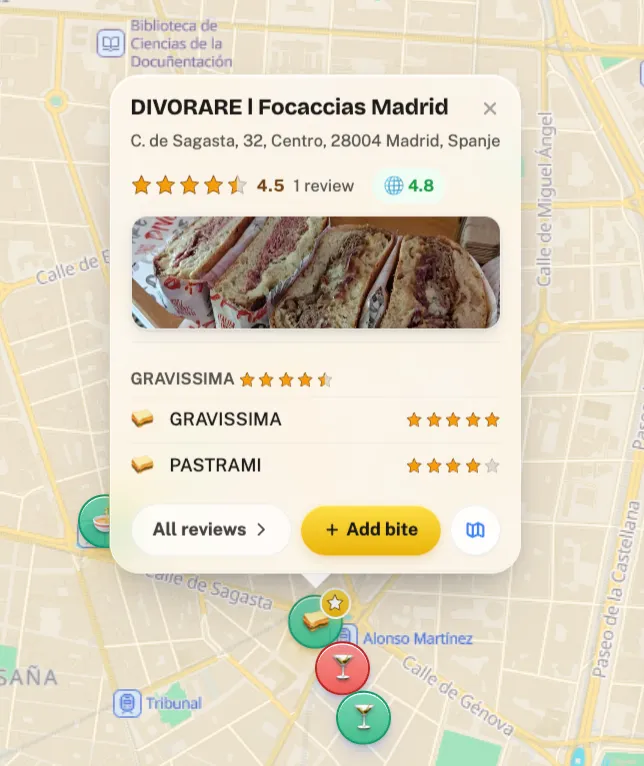
The difference is what gets rated. AteThat! rates the meal; Crumble rates the dish, from 0 to 5 in tenth-of-a-star steps. That sounds like a detail and it is the whole value of the record a year later: your history says the pastrami was a 5 and the porchetta a 4.5 at the same counter, so you know what to order rather than merely where to go.
It runs in any browser and installs on iOS and Android straight from the browser, so the platform problem disappears, and it is free.
It also has the social half AteThat! does not attempt: your map is friends-only by default, and your friends places appear on the same map, which is the part that makes a food record useful to somebody other than you.
And it covers both halves of eating. A home-cooked dish is the same kind of entry as a restaurant one, with up to ten recipes attachable to a home-made review. The method behind that is in how to track what you cook.
2. CookDiary: if it is mainly your own cooking
If most of what you were logging in AteThat! was food you cooked, CookDiary is more specialised than either of us. Its own framing is that it tracks every attempt at every dish, so a first go can be compared with a best one, and it builds a personal cookbook with AI feedback on top.
It now runs on iOS and Android, with a Google Play version linked from its own site, so it does solve the platform problem if you want an app store app. The caveat is focus: it is built around home cooking, so restaurant meals land in a second app. Free with in-app purchases, listed on the App Store from USD 3.99 for a week to USD 69.99 for full access. Our CookDiary alternatives page covers it in more depth.
3. Paprika: only if you wanted recipes, not a log
Worth ruling out early. Paprika is a recipe organiser: meal plans, grocery lists, a built-in browser for saving recipes from the web, sync, ingredient scaling and unit conversion, across iOS, Android, Mac and Windows, sold separately per platform.
It does not do what AteThat! does and it is not trying to. An organiser holds the cooking you are going to do; a log holds what you did. If you liked AteThat! at all, a log is what you want.
4. AteThat!, and why it is still good
Being fair to it: ninety-nine cents once, no subscription, in a category where everything else is either free with tiers or a recurring charge. That alone makes it the right answer for plenty of people.
And it shipped one genuinely good idea nobody else did: leftover reminders. If you cook in batches, that is a real feature solving a real problem, and none of the alternatives above replace it.
It also stores date and location automatically and covers restaurants and home cooking alike, so as a minimum viable food memory it is well judged. If it is doing what you need and you are on an iPhone, there is no reason to move.
Which AteThat! alternative should you use?
- You are on Android or a mixed household. Crumble, the only one here that also runs in a browser. CookDiary works too if you only log home cooking.
- You want to remember what you ordered, not just where. Crumble, for per-dish ratings.
- You want friends to see it. Crumble, and it is friends-only by default rather than public.
- You mainly cook, and want to compare attempts. CookDiary.
- You batch cook and love the leftover reminders. Stay on AteThat!, nothing else has them.
For the wider category see our food diary apps comparison, or the home cooking journal apps guide if the cooking half is what matters most. If you want a log without any calorie counting, food tracker apps covers that.
Start your food log today
Crumble is free, runs in the browser you already have, installs on iOS and Android, and rates each dish from 0 to 5 in tenth-of-a-star steps. Your first entry takes under a minute, and your friends see it, not the whole internet.
Frequently asked questions
What is the best AteThat! alternative?
Depends what sent you looking. For platform, Crumble runs in any browser and installs on iOS and Android, so it works on a phone AteThat! does not support. For a deeper record, Crumble rates each dish rather than each meal, so the history tells you what to order. If most of your logging is your own cooking, CookDiary is more specialised than either and is on iOS and Android.
Is AteThat! available on Android?
No. Its App Store listing requires iOS 18.2 or later on iPhone and iPad, with a Mac entry marked as not verified for macOS, and no web version is stated. That is the most common reason people go looking.
Is there an app like AteThat! for Android?
Yes. Crumble works on Android by installing from the browser, and on any computer, with photos, notes and a rating per dish. CookDiary has an Android app on Google Play, but it focuses on home cooking, so it only covers half of what AteThat! logs.
Can I export my meals from AteThat!?
Its App Store version history lists a data export feature added in version 1.1, in January 2026, so you can take a copy of your log with you. We have not tested what the file contains, so open it before planning a move to another app.
How much does AteThat! cost?
USD 0.99 as a one-time purchase per its App Store listing, with no subscription mentioned. In a category where most apps are free with paid tiers or a recurring charge, that is unusual and it is a genuine point in its favour.
What does AteThat! do that the alternatives do not?
Leftover reminders. Nobody else in this comparison ships them, and if you cook in batches it is a real feature solving a real problem. It also saves the date and location of a meal automatically and covers restaurants and home cooking alike.
Is there a free alternative to AteThat!?
Crumble is free, including per-dish ratings, photos, the friends map and attaching recipes to home-made entries. CookDiary is free to download with paid tiers. Paprika is paid per platform and is a recipe organiser rather than a log.
Why rate the dish instead of the meal?
Because a year later the useful question is what to order, not merely where to go. A per-meal rating says you liked a place. A per-dish rating says the pastrami was a 5 and the porchetta a 4.5 at the same counter, which is the thing you actually need standing at the counter.